
Search Site WE de DW-dev
Search within the current subdomain or within the entire domain, using the toolbar button or context menu.
852 de utilizatori852 de utilizatori
Metadate extensie
Capturi de ecran


Despre această extensie
CHANGES
Version 4.7
• Minor change.
OVERVIEW
Search Site WE provides facilities to search within the current subdomain or within the entire domain, using a selected search engine.
Search Site WE is an alternative no-restart version of the well established Search Site add-on.
Search Site WE is implemented using the new WebExtensions API and is available for both Firefox and Chrome with identical functions and user interfaces.
OPTIONS PAGE
The Search Site WE Options page can be accessed as follows:
• Firefox - On the menu bar select Tools > Add-ons (or press Ctrl+Shift+A), select the Extensions tab, and then click on the Options button.
• Chrome - Right-click on the toolbar button, and then select Options.
TOOLBAR BUTTON AND POPUP PANEL
After installation of Search Site WE, there will be a new green 'magnifying-glass' button on the main toolbar.
If Search Site WE cannot be used with the current page, the toolbar button will be disabled (greyed-out).
To search within a site, first click on the toolbar button to show the popup panel, then type the search terms into the search box, and then click on the 'Search Subdomain' button or the 'Search Entire Domain' button (or press Enter to search within the default search domain).
Normally, the search box is filled with the text from the previous search. However, if text in the page is selected before opening the popup panel, the search box will be filled with the selected text.
When text is entered into the search box, any previous matching searches are shown below the search box and can be selected to fill the search box.
To search using a specific search engine, click on the drop-down menu and select the required search engine.
To search only for exact matches to the entered text, tick the 'Exact matches' checkbox.
To open the search results in a new tab, tick the 'Open in new tab' checkbox.
The search engine, exact matches and open in new tab settings are always initialized from the Search Defaults options.
There is an option to show or hide search suggestions below the search box.
There is an option to show more settings on an additional row in the popup panel.
There is an option to apply the settings in the popup panel to the settings in the Search Defaults options tab.
CONTEXT MENU ITEMS
To search within a site, first select some text within the web page, then right-click on the selected text and choose the 'Search Site WE' menu item, and then choose either the 'Search Subdomain' or the 'Search Entire Domain' sub-menu item.
The search engine, exact matches and open in new tab settings are always taken from the Search Defaults options.
There is an option to show/hide the Search Site WE submenu item on the context menu.
There is an option to only show the default search domain on the context menu.
KEYBOARD SHORTCUTS
To open the toolbar button popup panel, press Alt+K. This shortcut can be reconfigured in the Shortcuts tab of the Search Site WE Options page.
SEARCH DEFAULTS
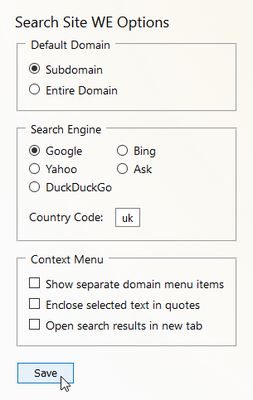
In the 'Search Defaults' tab of the Search Site WE Options page, there are options to specify the default search settings.
There is an option to specify the default 'Search Domain' as either the current 'Subdomain' or the 'Entire Domain'.
There is an option to specify the default 'Search Engine' that will be used for searches within sites. The search engine can be selected from 'Google', 'Bing', 'Yahoo', 'Ask', 'Ecosia', 'Yandex', 'Baidu' or 'DuckDuckGo'. The search engine can be either 'global' or 'local' (for a specific country). If a 'local' search engine is selected, the country code must be specified.
There is an option to specify the country code (e.g. 'de', 'es', 'it', 'fr', 'uk') for 'local' search engines.
There is an option to append additional search terms to the search URL, for example, &hl=fr to specify the language as French, or &pws=0 to de-personalize the search results.
There is an option to search only for exact matches, so that the entered text is searched as a single phrase.
There is an option to open the search results in a new tab.
SUPPORT
Please e-mail: dw-dev@gmx.com
LICENSE
Distributed under the GNU General Public License version 2.
See LICENCE.txt file and http://www.gnu.org/licenses/
Version 4.7
• Minor change.
OVERVIEW
Search Site WE provides facilities to search within the current subdomain or within the entire domain, using a selected search engine.
Search Site WE is an alternative no-restart version of the well established Search Site add-on.
Search Site WE is implemented using the new WebExtensions API and is available for both Firefox and Chrome with identical functions and user interfaces.
OPTIONS PAGE
The Search Site WE Options page can be accessed as follows:
• Firefox - On the menu bar select Tools > Add-ons (or press Ctrl+Shift+A), select the Extensions tab, and then click on the Options button.
• Chrome - Right-click on the toolbar button, and then select Options.
TOOLBAR BUTTON AND POPUP PANEL
After installation of Search Site WE, there will be a new green 'magnifying-glass' button on the main toolbar.
If Search Site WE cannot be used with the current page, the toolbar button will be disabled (greyed-out).
To search within a site, first click on the toolbar button to show the popup panel, then type the search terms into the search box, and then click on the 'Search Subdomain' button or the 'Search Entire Domain' button (or press Enter to search within the default search domain).
Normally, the search box is filled with the text from the previous search. However, if text in the page is selected before opening the popup panel, the search box will be filled with the selected text.
When text is entered into the search box, any previous matching searches are shown below the search box and can be selected to fill the search box.
To search using a specific search engine, click on the drop-down menu and select the required search engine.
To search only for exact matches to the entered text, tick the 'Exact matches' checkbox.
To open the search results in a new tab, tick the 'Open in new tab' checkbox.
The search engine, exact matches and open in new tab settings are always initialized from the Search Defaults options.
There is an option to show or hide search suggestions below the search box.
There is an option to show more settings on an additional row in the popup panel.
There is an option to apply the settings in the popup panel to the settings in the Search Defaults options tab.
CONTEXT MENU ITEMS
To search within a site, first select some text within the web page, then right-click on the selected text and choose the 'Search Site WE' menu item, and then choose either the 'Search Subdomain' or the 'Search Entire Domain' sub-menu item.
The search engine, exact matches and open in new tab settings are always taken from the Search Defaults options.
There is an option to show/hide the Search Site WE submenu item on the context menu.
There is an option to only show the default search domain on the context menu.
KEYBOARD SHORTCUTS
To open the toolbar button popup panel, press Alt+K. This shortcut can be reconfigured in the Shortcuts tab of the Search Site WE Options page.
SEARCH DEFAULTS
In the 'Search Defaults' tab of the Search Site WE Options page, there are options to specify the default search settings.
There is an option to specify the default 'Search Domain' as either the current 'Subdomain' or the 'Entire Domain'.
There is an option to specify the default 'Search Engine' that will be used for searches within sites. The search engine can be selected from 'Google', 'Bing', 'Yahoo', 'Ask', 'Ecosia', 'Yandex', 'Baidu' or 'DuckDuckGo'. The search engine can be either 'global' or 'local' (for a specific country). If a 'local' search engine is selected, the country code must be specified.
There is an option to specify the country code (e.g. 'de', 'es', 'it', 'fr', 'uk') for 'local' search engines.
There is an option to append additional search terms to the search URL, for example, &hl=fr to specify the language as French, or &pws=0 to de-personalize the search results.
There is an option to search only for exact matches, so that the entered text is searched as a single phrase.
There is an option to open the search results in a new tab.
SUPPORT
Please e-mail: dw-dev@gmx.com
LICENSE
Distributed under the GNU General Public License version 2.
See LICENCE.txt file and http://www.gnu.org/licenses/
Evaluat cu 4,8 de către 107 recenzori
Permisiuni și date
Permisiuni necesare:
- Să îți afișeze notificări
- Să acceseze filele browserului
- Să acceseze activitatea browserului în timpul navigării
- Să îți acceseze datele pentru toate site-urile web
Mai multe informații
- Linkurile suplimentului
- Versiune
- 4.7
- Mărime
- 73,84 KB
- Ultima actualizare
- 3 ani în urmă (3 feb. 2023)
- Categorii conexe
- Politică de confidențialitate
- Citește politica de confidențialitate pentru acest supliment
- Istoricul versiunilor
- Adaugă în colecție