
Sync To IO Drive de IO Integration
FireFox extension for IO Drive
6 utilizatori6 utilizatori
Metadate extensie
Capturi de ecran
Despre această extensie
‘Sync to IO Drive’ is a browser extension that enables users to synchronize files and folders from a Xinet Digital Assets Management ( DAM ) to an end user’s Mac Desktop.
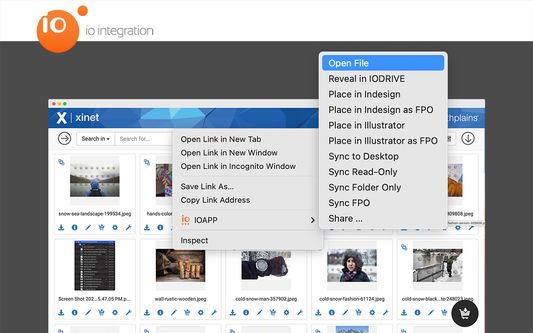
1. In the Xinet DAM, just choose which files or folders you want to work with on your local desktop.
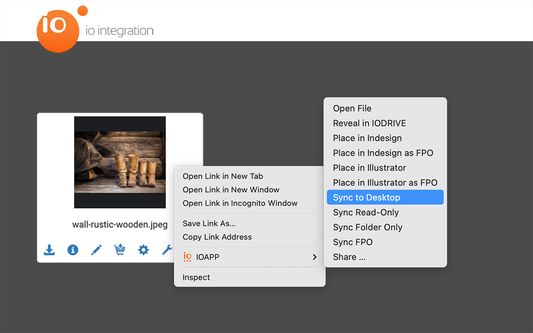
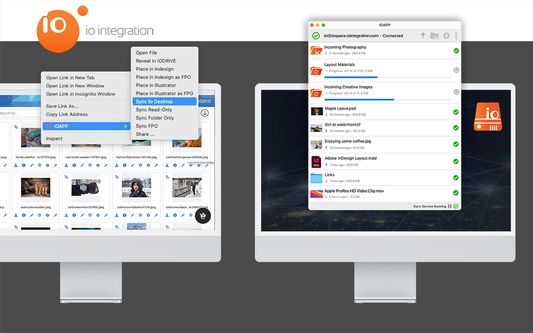
2. Right-clicking on a thumbnail and selecting ‘IO APP’ reveals a menu with options to sync and edit the file directly on your desktop.
3. Edit your assets in any desktop app and save your edits to the IO Drive sync folder.
4. Any edits will be synced to the Xinet DAM without any additional steps required by the user
Additional features available in the browser extension menu are:
- Sync to Desktop: Check-out the asset from the DAM and sync it to your local desktop
- Sync Read-Only: Sync the asset to your local desktop without locking
- Sync FPO: Sync a FPO (For Placement Only) asset to your local desktop
- Sync Folders: Syncs an entire folder structure to your local desktop without syncing the content
- Open: Syncs and opens the asset in the default macOS application on your client
- Place: Places the asset on an Adobe® InDesign or Illustrator page
- Share: Share and password protect your assets
The ‘Sync to IO Drive’ browser extension requires a valid licence for the IO Drive macOS Desktop application to work. Get in touch with IO Integration today and take a look at https://www.iointegration.com/io/io-drive/ for further details.
1. In the Xinet DAM, just choose which files or folders you want to work with on your local desktop.
2. Right-clicking on a thumbnail and selecting ‘IO APP’ reveals a menu with options to sync and edit the file directly on your desktop.
3. Edit your assets in any desktop app and save your edits to the IO Drive sync folder.
4. Any edits will be synced to the Xinet DAM without any additional steps required by the user
Additional features available in the browser extension menu are:
- Sync to Desktop: Check-out the asset from the DAM and sync it to your local desktop
- Sync Read-Only: Sync the asset to your local desktop without locking
- Sync FPO: Sync a FPO (For Placement Only) asset to your local desktop
- Sync Folders: Syncs an entire folder structure to your local desktop without syncing the content
- Open: Syncs and opens the asset in the default macOS application on your client
- Place: Places the asset on an Adobe® InDesign or Illustrator page
- Share: Share and password protect your assets
The ‘Sync to IO Drive’ browser extension requires a valid licence for the IO Drive macOS Desktop application to work. Get in touch with IO Integration today and take a look at https://www.iointegration.com/io/io-drive/ for further details.
Evaluat cu 0 de către 0 recenzori
Permisiuni și date
Permisiuni necesare:
- Să facă schimb de mesaje cu alte programe în afară de Firefox
- Să îți afișeze notificări
- Să acceseze filele browserului
- Să îți acceseze datele pentru toate site-urile web
Mai multe informații
- Linkurile suplimentului
- Versiune
- 0.19
- Mărime
- 85,34 KB
- Ultima actualizare
- 3 ani în urmă (25 ian. 2023)
- Categorii conexe
- Licență
- Mozilla Public License 2.0
- Istoricul versiunilor
- Etichete
- Adaugă în colecție