
Textmarker de underflyingbirches
Permanent web text highlighter
3.061 de utilizatori3.061 de utilizatori
Metadate extensie
Capturi de ecran



Despre această extensie
Stopped working?
Some users reported Textmarker stopped working after a Firefox update.
Unforntunately neither do we know yet what is causing the issue nor can we reproduce it.
For some users it helped to uninstall Textmarker, restart FF, re-install Textmarker - and eventually restart FF again. But other users had to refresh the whole FF profile.
If you need to backup your Textmarker data before the uninstall -> here you find how to do that:
https://github.com/ufb/Textmarker/issues/84#issuecomment-557044749
Backup your data
Please save a backup of your highlights and settings occasionally (you can do so on Textmarker's "Export & Import" page).
In the rare case you lost your data due to re-installation just import your backup file
Bug reports, problems, suggestions or feature requests via e-mail at undflybir@gmx.de or on https://github.com/ufb/Textmarker/issues
Feature requests in reviews (especially ones that lower the average rating) will be ignored.
Donations are very welcome - Thank you :)
Donate via Ko-Fi
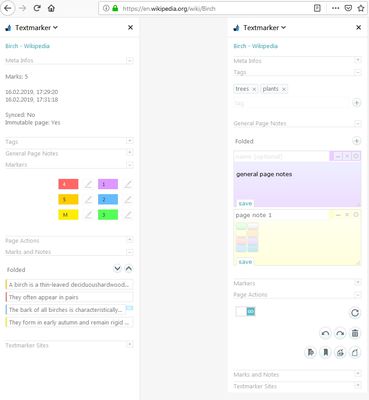
Once having Textmarker installed you can open the manual (see screenshot 5) to learn how to use the addon.
Attention: Restoration of saved highlights can fail - especially when the corresp. page's text content changes.
NOTES:
Permissions - what are they used for:
Textmarker does not send any data whatsoever to anyone. All permissions are mandatory in order for Textmarker to work.
necessary permissions:
Access your data for all websites: For insertion of highlights and restoration of stored highlights as well as actions on Textmarker shortcuts the add-on has to read the text content of the page and react on pressing certain keyboard keys
Display notifications to you: For displaying success, failure and error notifications - can be disabled in the settings
Access browser tabs: Textmarker will add URL and page title to stored highlights for being able to restore highlights on page revisit
these permissions are only being used if you want to copy highlights or want Textmarker to work in iFrames:
Input data to the clipboard: For copying highlight text to clipboard
Access browser activity during navigation: Used by Textmarker to get infos about iFrames (url and id) in order to load the content script into iFrames
Looking for translators
Anyone interested in translating Textmarker (right now it's only available in English, German and French)?
Please contact me via e-mail and I will send you the text file.
Note: FF doesn't allow extensions to work in built-in PDF-viewer anymore. Also not in Reader Mode.
Some users reported Textmarker stopped working after a Firefox update.
Unforntunately neither do we know yet what is causing the issue nor can we reproduce it.
For some users it helped to uninstall Textmarker, restart FF, re-install Textmarker - and eventually restart FF again. But other users had to refresh the whole FF profile.
If you need to backup your Textmarker data before the uninstall -> here you find how to do that:
https://github.com/ufb/Textmarker/issues/84#issuecomment-557044749
Backup your data
Please save a backup of your highlights and settings occasionally (you can do so on Textmarker's "Export & Import" page).
In the rare case you lost your data due to re-installation just import your backup file
Bug reports, problems, suggestions or feature requests via e-mail at undflybir@gmx.de or on https://github.com/ufb/Textmarker/issues
Feature requests in reviews (especially ones that lower the average rating) will be ignored.
Donations are very welcome - Thank you :)
Donate via Ko-Fi
Once having Textmarker installed you can open the manual (see screenshot 5) to learn how to use the addon.
Attention: Restoration of saved highlights can fail - especially when the corresp. page's text content changes.
- Mark text:
Select some text (i.e. with mouse), then click key M or 1-5 - Save
your changes and maintain them in the Textmarker history → [Ctrl] + [Alt] + [S] - Undo/Redo
your Textmarker actions using keyboard shortcuts - You can also permanently delete
any highlight via context menu. - Customize Mark Styles:
Define how exactly the selected text will be highlighted - Choose your shortcuts:
You can customize any shortcut. - Syning:
In case you have a Firefox sync account and have syncing enabled for addons Textmarker settings and highlights are being synchronized between your devices. If you don't sync your Firefox addons Textmarker will store your data locally. - Export:
Settings and saved highlights can be saved to a local file. - Bookmarks:
You can make text marks serve as bookmarks (→ on your next visit it will be scrolled to the lowermost bookmark automatically). - Wikipedia Look-Up:
Look up selected word on Wikipedia in a seperate tab - [W] - Sticky Notes:
Use context menu (right mouse button) for attaching a note to a highlight
NOTES:
Permissions - what are they used for:
Textmarker does not send any data whatsoever to anyone. All permissions are mandatory in order for Textmarker to work.
necessary permissions:
Access your data for all websites: For insertion of highlights and restoration of stored highlights as well as actions on Textmarker shortcuts the add-on has to read the text content of the page and react on pressing certain keyboard keys
Display notifications to you: For displaying success, failure and error notifications - can be disabled in the settings
Access browser tabs: Textmarker will add URL and page title to stored highlights for being able to restore highlights on page revisit
these permissions are only being used if you want to copy highlights or want Textmarker to work in iFrames:
Input data to the clipboard: For copying highlight text to clipboard
Access browser activity during navigation: Used by Textmarker to get infos about iFrames (url and id) in order to load the content script into iFrames
Looking for translators
Anyone interested in translating Textmarker (right now it's only available in English, German and French)?
Please contact me via e-mail and I will send you the text file.
Note: FF doesn't allow extensions to work in built-in PDF-viewer anymore. Also not in Reader Mode.
Evaluat cu 4,3 de către 172 de recenzori
Permisiuni și date
Permisiuni necesare:
- Să introducă date în clipboard
- Să îți afișeze notificări
- Să acceseze filele browserului
- Să acceseze activitatea browserului în timpul navigării
- Să îți acceseze datele pentru toate site-urile web
Permisiuni opționale:
- Să acceseze activitatea browserului în timpul navigării
Mai multe informații
- Linkurile suplimentului
- Versiune
- 5.3.3
- Mărime
- 273,59 KB
- Ultima actualizare
- 3 ani în urmă (2 dec. 2022)
- Licență
- Mozilla Public License 2.0
- Istoricul versiunilor
- Adaugă în colecție