
Pinterest downloader for entire boards | Unpinned de Uninspired Studio
Download Pinterest videos and images in bulk with Unpinned. Save entire boards, even those with over 5,000 pins — in top quality.
ExperimentalExperimental
Unele funcționalități pot fi cu platăUnele funcționalități pot fi cu plată
382 de utilizatori382 de utilizatori
Metadate extensie
Capturi de ecran


Despre această extensie
How It Works
1. Install Unpinned from the browser store.
2. Open Unpinned and create your free account.
3. Open any Pinterest board.
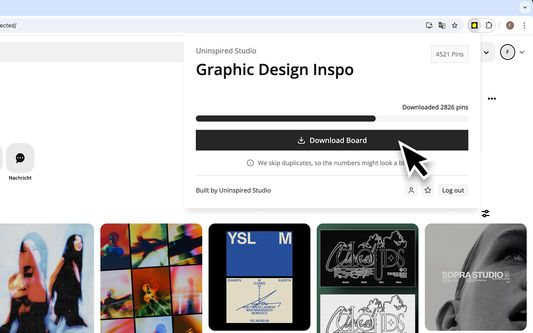
4. Launch Unpinned and start downloading Pinterest boards.
How to Access Unpinned After Installation
After installing, look for the Unpinned icon in the Firefox toolbar at the top-right corner. Not there? Click the Extensions (puzzle piece) button, find Unpinned, click the gear icon, and select Pin to Toolbar for quicker access.
Troubleshooting
🔹 Extension not working? Restart your browser and try again.
🔹 Still stuck? Reach out to us — we actually reply!
Features
- Bulk Download Images & Videos – Download entire Pinterest boards in seconds — whether it's 50 pins or 5,000. Save time with effortless, one-click downloads.
- Quality – Say goodbye to blurry, compressed images. Unpinned saves Pinterest images and videos in their highest original resolution.
Choose Your Plan
- Free Plan – Enjoy essential features at no cost. Download boards with up to 50 pins in the highest possible quality — no commitments.
- Yearly Plan €50/year – Save big with an annual subscription. Unlock unlimited bulk downloads (up to 5,000+ images per board) at full quality.
- Monthly Plan €6/month Prefer flexibility? Get unlimited access on a month-to-month basis with full-quality downloads.
Having trouble affording it? Send us an email — we're happy to work something out.
> Support Us! – As a small studio, every review means the world to us. If you enjoy using Unpinned, please consider leaving a review — it really helps!
Legal Notice
By using Unpinned, you agree to our Privacy Policy. Unpinned is not affiliated with Pinterest. It is an independent tool and is neither endorsed nor certified by Pinterest. All trademarks are the property of their respective owners.
Built with 🪄💫🐇🖤 by Uninspired Studio
1. Install Unpinned from the browser store.
2. Open Unpinned and create your free account.
3. Open any Pinterest board.
4. Launch Unpinned and start downloading Pinterest boards.
How to Access Unpinned After Installation
After installing, look for the Unpinned icon in the Firefox toolbar at the top-right corner. Not there? Click the Extensions (puzzle piece) button, find Unpinned, click the gear icon, and select Pin to Toolbar for quicker access.
Troubleshooting
🔹 Extension not working? Restart your browser and try again.
🔹 Still stuck? Reach out to us — we actually reply!
Features
- Bulk Download Images & Videos – Download entire Pinterest boards in seconds — whether it's 50 pins or 5,000. Save time with effortless, one-click downloads.
- Quality – Say goodbye to blurry, compressed images. Unpinned saves Pinterest images and videos in their highest original resolution.
Choose Your Plan
- Free Plan – Enjoy essential features at no cost. Download boards with up to 50 pins in the highest possible quality — no commitments.
- Yearly Plan €50/year – Save big with an annual subscription. Unlock unlimited bulk downloads (up to 5,000+ images per board) at full quality.
- Monthly Plan €6/month Prefer flexibility? Get unlimited access on a month-to-month basis with full-quality downloads.
Having trouble affording it? Send us an email — we're happy to work something out.
> Support Us! – As a small studio, every review means the world to us. If you enjoy using Unpinned, please consider leaving a review — it really helps!
Legal Notice
By using Unpinned, you agree to our Privacy Policy. Unpinned is not affiliated with Pinterest. It is an independent tool and is neither endorsed nor certified by Pinterest. All trademarks are the property of their respective owners.
Built with 🪄💫🐇🖤 by Uninspired Studio
Evaluat cu 4,5 de către 8 recenzori
Permisiuni și date
Permisiuni necesare:
- Să descarce fișiere și să citească sau să modifice istoricul descărcărilor din browser
- Să acceseze filele browserului
- Să îți acceseze datele pentru site-uri din domeniul pinterest.com
- Să îți acceseze datele pentru site-uri din domeniul pinterest.info
- Să îți acceseze datele pentru site-uri din domeniul pinterest.at
- Să îți acceseze datele pentru site-uri din domeniul pinterest.com.au
- Să îți acceseze datele pentru site-uri din domeniul pinterest.ca
- Să îți acceseze datele pentru site-uri din domeniul pinterest.ch
- Să îți acceseze datele pentru site-uri din domeniul pinterest.cl
- Să îți acceseze datele pentru site-uri din domeniul pinterest.de
- Să îți acceseze datele pentru site-uri din domeniul pinterest.dk
- Să îți acceseze datele pentru site-uri din domeniul pinterest.es
- Să îți acceseze datele pentru site-uri din domeniul pinterest.fr
- Să îți acceseze datele pentru site-uri din domeniul pinterest.co.uk
- Să îți acceseze datele pentru site-uri din domeniul pinterest.ie
- Să îți acceseze datele pentru site-uri din domeniul pinterest.jp
- Să îți acceseze datele pentru site-uri din domeniul pinterest.co.kr
- Să îți acceseze datele pentru site-uri din domeniul pinterest.com.mx
- Să îți acceseze datele pentru site-uri din domeniul pinterest.nz
- Să îți acceseze datele pentru site-uri din domeniul pinterest.se
- Să îți acceseze datele pentru site-uri din domeniul pinterest.ph
- Să îți acceseze datele pentru site-uri din domeniul pinterest.pt
- Să îți acceseze datele pentru site-uri din domeniul pinterest.ru
- Să îți acceseze datele pentru api.unpinned.app
- Să îți acceseze datele pentru i.pinimg.com
- Să îți acceseze datele pentru v1.pinimg.com
Mai multe informații
- Linkurile suplimentului
- Versiune
- 1.0.13
- Mărime
- 2,16 MB
- Ultima actualizare
- 2 luni în urmă (29 ian. 2026)
- Licență
- Toate drepturile rezervate
- Politică de confidențialitate
- Citește politica de confidențialitate pentru acest supliment
- Istoricul versiunilor
- Adaugă în colecție