
WebSafe365 de Innovotech Solutions Ltd
With WebSafe 365, you can control your kids browser access from WebSafe 365 mobile app.
Unele funcționalități pot fi cu platăUnele funcționalități pot fi cu plată
1 utilizator1 utilizator
Metadate extensie
Capturi de ecran
Despre această extensie
WebSafe365 Parental Control
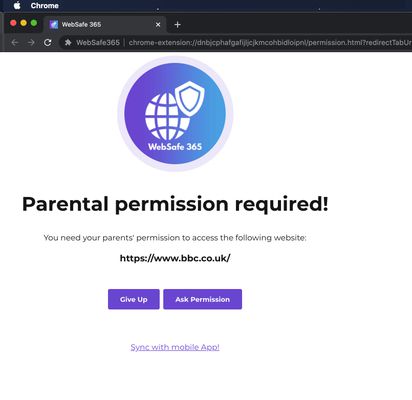
WebSafe 365 lets you control your kids PC/Mac web browsing using our mobile app.
install our web browser extension on kids PC/Mac browser and WebSafe 365 parent app on your mobile. Once intial setup is complete, your kid will need your mobile app permission to access any website on their computer.
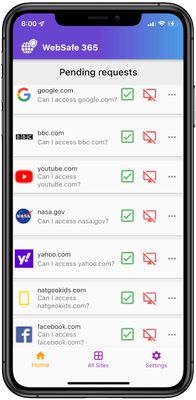
Parent can grant access or reject access to a website using Websafe 365 mobile app. If you accept a request, kids web browser will redirect to the website automatically. Otherwise website will remain blocked.
You can also set time limits on how long your kid should access a website. Such as 30 mins, 1 hour, 3 hours, 1 day etc.
You can also manage list of websites kids should access on their desktop computer using our WebSafe 365 mobile app.
SETUP GUIDE
----------------------
1. Install our free WebSafe 365 extension on your kid’s computer (this extension). -
2. install WebSafe 365 parent mobile app on parents’ mobile -
* Google Play Store: https://play.google.com/store/apps/details?id=com.innovotech.websafe365
* Apple App Store: https://apps.apple.com/us/app/websafe-365/id1589704427
3. Scan the QR code using WebSafe 365 mobile app to link the kids desktop browser and your mobile app.
WebSafe 365 lets you control your kids PC/Mac web browsing using our mobile app.
install our web browser extension on kids PC/Mac browser and WebSafe 365 parent app on your mobile. Once intial setup is complete, your kid will need your mobile app permission to access any website on their computer.
Parent can grant access or reject access to a website using Websafe 365 mobile app. If you accept a request, kids web browser will redirect to the website automatically. Otherwise website will remain blocked.
You can also set time limits on how long your kid should access a website. Such as 30 mins, 1 hour, 3 hours, 1 day etc.
You can also manage list of websites kids should access on their desktop computer using our WebSafe 365 mobile app.
SETUP GUIDE
----------------------
1. Install our free WebSafe 365 extension on your kid’s computer (this extension). -
2. install WebSafe 365 parent mobile app on parents’ mobile -
* Google Play Store: https://play.google.com/store/apps/details?id=com.innovotech.websafe365
* Apple App Store: https://apps.apple.com/us/app/websafe-365/id1589704427
3. Scan the QR code using WebSafe 365 mobile app to link the kids desktop browser and your mobile app.
Evaluat cu 0 de către 0 recenzori
Permisiuni și date
Permisiuni necesare:
- Să îți afișeze notificări
- Să acceseze filele browserului
- Să îți acceseze datele pentru websafe365.com
Mai multe informații
- Linkurile suplimentului
- Versiune
- 1.0.8
- Mărime
- 48,04 KB
- Ultima actualizare
- 4 ani în urmă (5 nov. 2021)
- Categorii conexe
- Licență
- Mozilla Public License 2.0
- Politică de confidențialitate
- Citește politica de confidențialitate pentru acest supliment
- Istoricul versiunilor
- Etichete
- Adaugă în colecție