
Weh Inspector de mig
Trace Remote Procedure Calls on Weh-2 addons
27 de utilizatori27 de utilizatori
Metadate extensie
Capturi de ecran


Despre această extensie
WehInspector is a tool add-on to help debugging WebExtensions add-ons developed with the Weh2 toolkit (available under Mozilla Public License 2.0 from https://github.com/mi-g/weh.
It provides the following capabilities:
The WehInspector add-on, along with its source code, is part of the Weh2 project and you can build and install it from there, but for convenience it is also available publicly for direct installation.
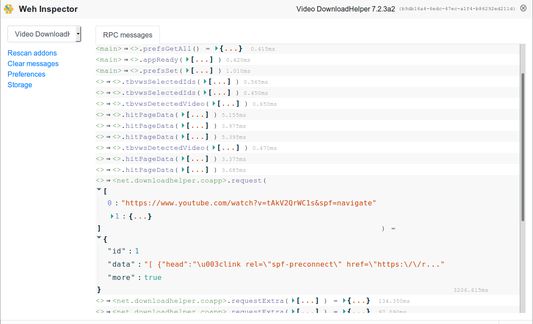
WehInspector user interface runs in a single tab. To create or select that tab, right click in a page content and pick "Weh Inspector" from the context menu. In the dropdown menu at the top left, select the Weh2-based addon to debug (if you have only one installed, it will be selected automatically).
There is one thing it is important to understand when inspecting RPC calls: WehInspector has a settings parameter, "Messages display mode", that can take one of 3 values: "synchronous on call", "synchronous on reply", "asynchronous". Let's take a common situation where the background calls a function A from a content component, this function calls B from the background and returns. This will be 4 messages: call A, call B, reply B, reply A. If the "Messages display mode" is set to "synchronous on reply" (the default), you will see 2 entries in the WehInspector interface: the call to B, then the call to A. If set to "synchronous on call": the call to A, then the call to B, and if "asynchronous", you will see 4 entries corresponding to the messages explained earlier.
It provides the following capabilities:
- Trace Weh Remote Procedure Calls between the add-on background and other components: local add-on content, web pages injected content, web workers, native applications, ...
- Read and write add-on preferences
- Read add-on storage data (both HTML5 and WebExtensions storage API)
The WehInspector add-on, along with its source code, is part of the Weh2 project and you can build and install it from there, but for convenience it is also available publicly for direct installation.
WehInspector user interface runs in a single tab. To create or select that tab, right click in a page content and pick "Weh Inspector" from the context menu. In the dropdown menu at the top left, select the Weh2-based addon to debug (if you have only one installed, it will be selected automatically).
There is one thing it is important to understand when inspecting RPC calls: WehInspector has a settings parameter, "Messages display mode", that can take one of 3 values: "synchronous on call", "synchronous on reply", "asynchronous". Let's take a common situation where the background calls a function A from a content component, this function calls B from the background and returns. This will be 4 messages: call A, call B, reply B, reply A. If the "Messages display mode" is set to "synchronous on reply" (the default), you will see 2 entries in the WehInspector interface: the call to B, then the call to A. If set to "synchronous on call": the call to A, then the call to B, and if "asynchronous", you will see 4 entries corresponding to the messages explained earlier.
Evaluat cu 4,2 de către 6 recenzori
Permisiuni și date
Permisiuni necesare:
- Să monitorizeze utilizarea de extensii și să gestioneze teme
- Să acceseze filele browserului
Mai multe informații
- Linkurile suplimentului
- Versiune
- 2.2resigned1
- Mărime
- 305,82 KB
- Ultima actualizare
- 2 ani în urmă (25 apr. 2024)
- Categorii conexe
- Licență
- Mozilla Public License 2.0
- Istoricul versiunilor
- Adaugă în colecție