
/clean for Slack — SlashTools
Bulk delete Slack messages directly from your browser - no OAuth required
Nekatere funkcije morda zahtevajo plačiloNekatere funkcije morda zahtevajo plačilo
5 uporabnikov5 uporabnikov
Metapodatki o razširitvi
Posnetki zaslona


O tej razširitvi
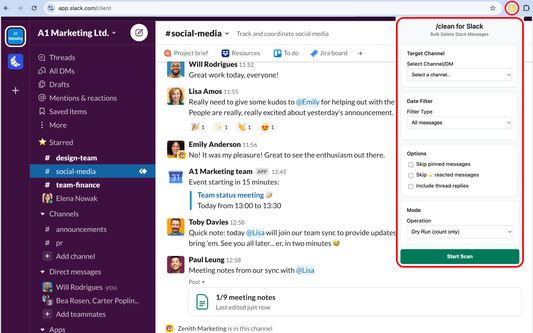
/clean for Slack is the easiest way to bulk delete messages in Slack directly from your browser.
Why use it?
Slack doesn’t make it easy to clean up old conversations. This extension gives you full control: bulk delete by channel, DM, or date range — no OAuth, no external servers.
Features:
● Bulk delete messages in channels, DMs, and group chats
● Filter by date, user and reaction type (including starred and pinned messages)
● Built-in handling of Slack rate limits for safe, reliable cleanup
● Admins/owners can delete all messages
● Non-admins can delete only their own messages
How it works:
1. Purchase a license on Gumroad and enter your key in the extension popup
2. Open Slack in your browser
3. Select a channel, DM, or group chat from the dropdown
4. Apply filters and delete messages in bulk
Important notes:
● Your data never leaves Slack — all actions happen locally in your browser
● Deletions respect Slack’s built-in rate limits, so larger jobs may take some time
● Non-admin users are restricted by Slack to deleting only their own messages
Take control of your Slack history today with /clean for Slack.
Why use it?
Slack doesn’t make it easy to clean up old conversations. This extension gives you full control: bulk delete by channel, DM, or date range — no OAuth, no external servers.
Features:
● Bulk delete messages in channels, DMs, and group chats
● Filter by date, user and reaction type (including starred and pinned messages)
● Built-in handling of Slack rate limits for safe, reliable cleanup
● Admins/owners can delete all messages
● Non-admins can delete only their own messages
How it works:
1. Purchase a license on Gumroad and enter your key in the extension popup
2. Open Slack in your browser
3. Select a channel, DM, or group chat from the dropdown
4. Apply filters and delete messages in bulk
Important notes:
● Your data never leaves Slack — all actions happen locally in your browser
● Deletions respect Slack’s built-in rate limits, so larger jobs may take some time
● Non-admin users are restricted by Slack to deleting only their own messages
Take control of your Slack history today with /clean for Slack.
Ocena 0 (0 mnenj)
Dovoljenja in podatki
Zahtevana dovoljenja:
- dostopa do vaših podatkov za spletna mesta na domeni slack.com
- dostopa do vaših podatkov za slack.com
Neobvezna dovoljenja:
- dostopa do vaših podatkov za spletna mesta na domeni slack.com
- dostopa do vaših podatkov za slack.com
- dostopa do vaših podatkov za api.gumroad.com
Več informacij
- Povezave dodatka
- Različica
- 1.0.0
- Velikost
- 44,98 KB
- Zadnja posodobitev
- pred 7 meseci (1. sep. 2025)
- Sorodne kategorije
- Licenca
- Vse pravice pridržane
- Pravilnik o zasebnosti
- Preberite pravilnik o zasebnosti za ta dodatek
- Zgodovina različic
- Dodaj v zbirko