
Multi-Text Selector | Copy Multiple Texts nga Natrium Studios
Multi-Text Selector Chrome Extension | Copy Multiple Texts Easily Select & copy multiple text segments from any webpage at once. Choose separators: space, newline, comma, bullets, or numbered list.
36 Përdorues36 Përdorues
Tejtëdhëna Zgjerimi
Foto ekrani


Rreth këtij zgjerimi
🔹 Multi-Text Selector — Select & Copy Multiple Text Segments Instantly
Tired of copying text one paragraph at a time? The Multi-Text Selector Chrome Extension lets you select multiple, non-contiguous text segments from any webpage and copy them all at once — with a single CTRL+C.
Whether you're a student gathering research notes, a writer collecting quotes, a marketer extracting web snippets, or a researcher compiling data from multiple sources — this free browser productivity tool eliminates repetitive copy-paste actions and saves you hours of manual work.
━━━━━━━━━━━━━━━━━━━━━━━━━━━
🚀 KEY FEATURES
✅ Multi-Text Selection — Hold CTRL and highlight multiple text segments across any webpage. Select sentences, words, phrases, or entire paragraphs from different sections — all in one go.
✅ One-Click Copy — Press CTRL+C to instantly copy every selected segment to your clipboard. No more switching back and forth between your document and the webpage.
✅ 5 Separator Formats — Choose how your copied text is organized:
• Space — Segments joined with a single space
• New Line — Each segment on a separate line
• Comma — Segments separated by commas
• Bullet List (•) — Formatted as a bulleted list
• Numbered List (1. 2. 3.) — Formatted as an ordered list
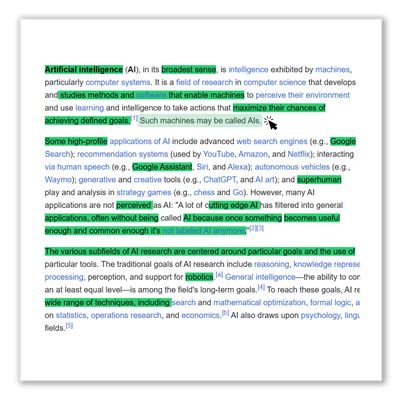
✅ Visual Highlighting — Every selected text segment is highlighted in green so you can see exactly what you've picked before copying.
✅ Floating Segment Counter — A live badge shows how many segments you've selected, plus a "Copied!" confirmation when you press CTRL+C.
✅ Toggle On/Off — Enable or disable multi-select mode anytime from the popup. When turned off, your browser's normal copy-paste behavior works as usual.
✅ 100% Free & Privacy-Safe — No data collection. No tracking. No accounts. The extension works entirely in your browser and never sends your data anywhere.
━━━━━━━━━━━━━━━━━━━━━━━━━━━
📖 HOW TO USE THE MULTI-TEXT SELECTOR
1️⃣ INSTALL — Click "Add to Chrome" from the Chrome Web Store (or visit FreeAIToolsBox.com).
2️⃣ ACTIVATE — Click the extension icon in your toolbar and turn ON the toggle switch.
3️⃣ SELECT — Hold the CTRL key on your keyboard and use your mouse to highlight any number of text snippets across the page. Each selection is highlighted in green.
4️⃣ CHOOSE A SEPARATOR — Open the extension popup and pick your preferred copy format: Space, New Line, Comma, Bullet List, or Numbered List.
5️⃣ COPY — Press CTRL+C. All your selected segments are instantly combined using your chosen separator and copied to your clipboard.
6️⃣ PASTE — Open Google Docs, Word, Notion, your notes app, email, or any text field and press CTRL+V to paste your neatly formatted text.
━━━━━━━━━━━━━━━━━━━━━━━━━━━
👤 WHO IS THIS EXTENSION FOR?
🎓 Students — Quickly gather notes, definitions, and key points from online textbooks, articles, and research papers without copying one sentence at a time.
📝 Writers & Bloggers — Collect quotes, statistics, and references from multiple sources in seconds. Paste them as a formatted list directly into your draft.
🔬 Researchers & Academics — Extract data points, findings, and citations from academic papers and compile them into organized notes effortlessly.
📊 Marketers & SEO Professionals — Pull competitor copy, ad text, meta descriptions, and keyword ideas from multiple web pages in one sweep.
💻 Developers — Copy code snippets, error messages, or documentation sections from different parts of a page and paste them into your IDE or notes.
📋 Virtual Assistants & Data Entry — Speed up data collection tasks by selecting and copying multiple fields, names, or entries from web-based databases and directories.
👨💼 Anyone Who Copies Text Online — If you regularly copy text from the internet for any purpose, this extension will save you time every single day.
━━━━━━━━━━━━━━━━━━━━━━━━━━━
❓ FREQUENTLY ASKED QUESTIONS (FAQs)
Q: What is the Multi-Text Selector Chrome Extension?
A: It's a free, lightweight Chrome extension that lets you select and copy multiple, non-contiguous text segments from any webpage at once. Instead of copying text one piece at a time, you hold CTRL, highlight multiple sections, and press CTRL+C to copy them all together — with your choice of separator format.
Q: How do I select multiple text segments on a webpage?
A: After enabling the extension, hold the CTRL key on your keyboard and use your mouse to highlight text segments anywhere on the page. Each selected segment is highlighted in green. You can select as many segments as you need.
Q: How do I copy all the selected text?
A: Once you've highlighted all your desired segments, press CTRL+C. The extension automatically joins all selections using your chosen separator (space, new line, comma, bullets, or numbers) and copies them to your clipboard.
Q: Can I choose how the copied text is formatted?
A: Yes! Open the extension popup and choose from 5 separator options: Space, New Line, Comma, Bullet List (•), or Numbered List (1. 2. 3.). Your preference is saved automatically.
Q: Can I turn the extension on and off?
A: Absolutely. Click the extension icon and use the toggle switch. When disabled, your browser's default text selection and copy behavior works normally. No interference.
Q: Is the extension free?
A: Yes, 100% free. No premium tiers. No subscriptions. No hidden charges. Available on the Chrome Web Store and FreeAIToolsBox.com.
Q: Is my data safe and private?
A: Completely. The extension does NOT collect, store, or transmit any personal data. It only processes text you manually select, entirely within your local browser. No analytics, no tracking, no cookies.
Q: Does it work on all websites?
A: It works on the vast majority of websites. The content script runs on all URLs. However, some websites with very complex DOM structures or copy-protection scripts may have limited compatibility.
Q: Can I use this on other browsers?
A: Currently available for Google Chrome and Chromium-based browsers (Edge, Brave, Opera, Vivaldi). A Firefox version is also available.
Q: Where can I get support?
A: Visit FreeAIToolsBox.com or use the "Contact" page on our website for assistance, feature requests, or feedback.
Tired of copying text one paragraph at a time? The Multi-Text Selector Chrome Extension lets you select multiple, non-contiguous text segments from any webpage and copy them all at once — with a single CTRL+C.
Whether you're a student gathering research notes, a writer collecting quotes, a marketer extracting web snippets, or a researcher compiling data from multiple sources — this free browser productivity tool eliminates repetitive copy-paste actions and saves you hours of manual work.
━━━━━━━━━━━━━━━━━━━━━━━━━━━
🚀 KEY FEATURES
✅ Multi-Text Selection — Hold CTRL and highlight multiple text segments across any webpage. Select sentences, words, phrases, or entire paragraphs from different sections — all in one go.
✅ One-Click Copy — Press CTRL+C to instantly copy every selected segment to your clipboard. No more switching back and forth between your document and the webpage.
✅ 5 Separator Formats — Choose how your copied text is organized:
• Space — Segments joined with a single space
• New Line — Each segment on a separate line
• Comma — Segments separated by commas
• Bullet List (•) — Formatted as a bulleted list
• Numbered List (1. 2. 3.) — Formatted as an ordered list
✅ Visual Highlighting — Every selected text segment is highlighted in green so you can see exactly what you've picked before copying.
✅ Floating Segment Counter — A live badge shows how many segments you've selected, plus a "Copied!" confirmation when you press CTRL+C.
✅ Toggle On/Off — Enable or disable multi-select mode anytime from the popup. When turned off, your browser's normal copy-paste behavior works as usual.
✅ 100% Free & Privacy-Safe — No data collection. No tracking. No accounts. The extension works entirely in your browser and never sends your data anywhere.
━━━━━━━━━━━━━━━━━━━━━━━━━━━
📖 HOW TO USE THE MULTI-TEXT SELECTOR
1️⃣ INSTALL — Click "Add to Chrome" from the Chrome Web Store (or visit FreeAIToolsBox.com).
2️⃣ ACTIVATE — Click the extension icon in your toolbar and turn ON the toggle switch.
3️⃣ SELECT — Hold the CTRL key on your keyboard and use your mouse to highlight any number of text snippets across the page. Each selection is highlighted in green.
4️⃣ CHOOSE A SEPARATOR — Open the extension popup and pick your preferred copy format: Space, New Line, Comma, Bullet List, or Numbered List.
5️⃣ COPY — Press CTRL+C. All your selected segments are instantly combined using your chosen separator and copied to your clipboard.
6️⃣ PASTE — Open Google Docs, Word, Notion, your notes app, email, or any text field and press CTRL+V to paste your neatly formatted text.
━━━━━━━━━━━━━━━━━━━━━━━━━━━
👤 WHO IS THIS EXTENSION FOR?
🎓 Students — Quickly gather notes, definitions, and key points from online textbooks, articles, and research papers without copying one sentence at a time.
📝 Writers & Bloggers — Collect quotes, statistics, and references from multiple sources in seconds. Paste them as a formatted list directly into your draft.
🔬 Researchers & Academics — Extract data points, findings, and citations from academic papers and compile them into organized notes effortlessly.
📊 Marketers & SEO Professionals — Pull competitor copy, ad text, meta descriptions, and keyword ideas from multiple web pages in one sweep.
💻 Developers — Copy code snippets, error messages, or documentation sections from different parts of a page and paste them into your IDE or notes.
📋 Virtual Assistants & Data Entry — Speed up data collection tasks by selecting and copying multiple fields, names, or entries from web-based databases and directories.
👨💼 Anyone Who Copies Text Online — If you regularly copy text from the internet for any purpose, this extension will save you time every single day.
━━━━━━━━━━━━━━━━━━━━━━━━━━━
❓ FREQUENTLY ASKED QUESTIONS (FAQs)
Q: What is the Multi-Text Selector Chrome Extension?
A: It's a free, lightweight Chrome extension that lets you select and copy multiple, non-contiguous text segments from any webpage at once. Instead of copying text one piece at a time, you hold CTRL, highlight multiple sections, and press CTRL+C to copy them all together — with your choice of separator format.
Q: How do I select multiple text segments on a webpage?
A: After enabling the extension, hold the CTRL key on your keyboard and use your mouse to highlight text segments anywhere on the page. Each selected segment is highlighted in green. You can select as many segments as you need.
Q: How do I copy all the selected text?
A: Once you've highlighted all your desired segments, press CTRL+C. The extension automatically joins all selections using your chosen separator (space, new line, comma, bullets, or numbers) and copies them to your clipboard.
Q: Can I choose how the copied text is formatted?
A: Yes! Open the extension popup and choose from 5 separator options: Space, New Line, Comma, Bullet List (•), or Numbered List (1. 2. 3.). Your preference is saved automatically.
Q: Can I turn the extension on and off?
A: Absolutely. Click the extension icon and use the toggle switch. When disabled, your browser's default text selection and copy behavior works normally. No interference.
Q: Is the extension free?
A: Yes, 100% free. No premium tiers. No subscriptions. No hidden charges. Available on the Chrome Web Store and FreeAIToolsBox.com.
Q: Is my data safe and private?
A: Completely. The extension does NOT collect, store, or transmit any personal data. It only processes text you manually select, entirely within your local browser. No analytics, no tracking, no cookies.
Q: Does it work on all websites?
A: It works on the vast majority of websites. The content script runs on all URLs. However, some websites with very complex DOM structures or copy-protection scripts may have limited compatibility.
Q: Can I use this on other browsers?
A: Currently available for Google Chrome and Chromium-based browsers (Edge, Brave, Opera, Vivaldi). A Firefox version is also available.
Q: Where can I get support?
A: Visit FreeAIToolsBox.com or use the "Contact" page on our website for assistance, feature requests, or feedback.
Vlerësuar me 0 nga 0 shqyrtues
Leje dhe të dhëna
Leje të domosdoshme:
- Të fusë të dhëna në të papastër
- Të hyjë në të dhënat tuaja për krejt sajtet
Më tepër të dhëna
- Lidhje shtese
- Version
- 1.1.2
- Madhësi
- 473,76 KB
- Përditësuar së fundi më
- 3 ditë më parë (25 Mar 2026)
- Kategori të Afërta
- Licencë
- Mozilla Public License 2.0
- Historik Versionesh
- Shtojeni në koleksion