Tickety-Tick nga bitcrowd
How do you name this branch? What is the message for that commit? At bitcrowd we love conventions. One of them is how we name branches and commits. This makes it easy to relate a particular branch or commit to a certain ticket.
18 Përdorues18 Përdorues
Tejtëdhëna Zgjerimi
Foto ekrani
Rreth këtij zgjerimi
How do you name this branch? What is the message for that commit?
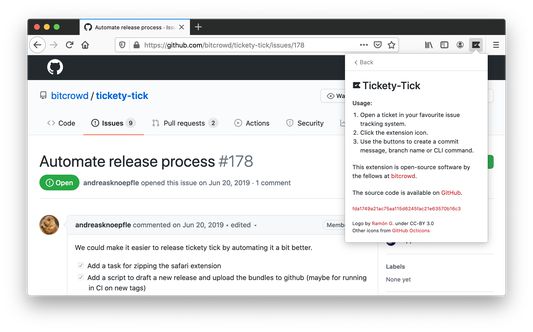
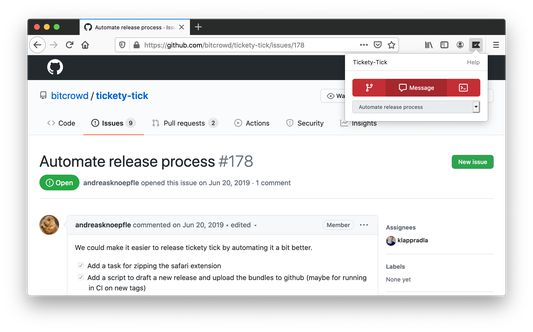
At bitcrowd we love conventions. One of them is how we name branches and commits. This makes it easy to relate a particular branch or commit to a certain ticket. Just open a ticket or select it and click on the tickety-tick button. You will see a dialog where you can copy a branch name or the commit message.
Branches by default always follow the format type/id-title, where type can be one of feature, bug, chore etc., id is the identifier of the ticket in your ticketing system and title is a lowercase, dasherized version of the ticket title.
Commit messages default to the format "[#id] title".
If you have different conventions regarding commit messages, branch names or just use a different source management tool, you can also customize the output format to your needs in the preferences.
Tickety-Tick helps you create branches and commits for a few ticket systems.
Currently, we support:
<ul>
<li>GitHub</li>
<li>GitLab</li>
<li>Jira</li>
<li>Linear.app</li>
<li>Notion</li>
<li>Tara</li>
<li>Trello</li>
<li>YouTrack</li>
<li>Polarion</li>
</ul>
At bitcrowd we love conventions. One of them is how we name branches and commits. This makes it easy to relate a particular branch or commit to a certain ticket. Just open a ticket or select it and click on the tickety-tick button. You will see a dialog where you can copy a branch name or the commit message.
Branches by default always follow the format type/id-title, where type can be one of feature, bug, chore etc., id is the identifier of the ticket in your ticketing system and title is a lowercase, dasherized version of the ticket title.
Commit messages default to the format "[#id] title".
If you have different conventions regarding commit messages, branch names or just use a different source management tool, you can also customize the output format to your needs in the preferences.
Tickety-Tick helps you create branches and commits for a few ticket systems.
Currently, we support:
<ul>
<li>GitHub</li>
<li>GitLab</li>
<li>Jira</li>
<li>Linear.app</li>
<li>Notion</li>
<li>Tara</li>
<li>Trello</li>
<li>YouTrack</li>
<li>Polarion</li>
</ul>
Vlerësuar me 5 nga 3 shqyrtues
Leje dhe të dhëna
Leje të domosdoshme:
- Të fusë të dhëna në të papastër
- Të hyjë në të dhënat tuaja për krejt sajtet
Më tepër të dhëna
- Lidhje shtese
- Version
- 5.6.0
- Madhësi
- 1,31 MB
- Përditësuar së fundi më
- 4 muaj më parë (27 Tet 2025)
- Kategori të Afërta
- Licencë
- Licencë MIT
- Historik Versionesh
- Shtojeni në koleksion