
Toggle Resist Fingerprinting av Aaron Papp
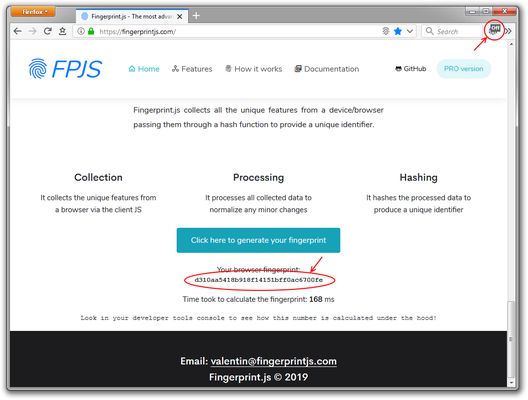
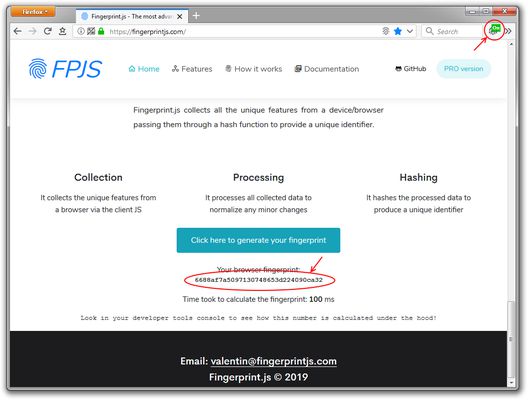
Adds a button to the tab bar to toggle the "resist fingerprinting" setting.
353 användare353 användare
Metadata för tillägg
Skärmbilder
Om detta tillägg
Adds a button to the tab bar* to toggle the "resist fingerprinting" setting; to help prevent websites from fingerprinting your browser for tracking purposes.
Enabling the "resist fingerprinting" setting may break some websites. Information about the "resist fingerprinting" setting can be found at <a href="https://wiki.mozilla.org/Security/Fingerprinting">https://wiki.mozilla.org/Security/Fingerprinting</a>.
Icon made by <a href="https://www.freepik.com/">Freepik</a> from Flaticon is licensed by <a href="http://creativecommons.org/licenses/by/3.0/">CC 3.0 BY</a>
Enabling the "resist fingerprinting" setting may break some websites. Information about the "resist fingerprinting" setting can be found at <a href="https://wiki.mozilla.org/Security/Fingerprinting">https://wiki.mozilla.org/Security/Fingerprinting</a>.
Icon made by <a href="https://www.freepik.com/">Freepik</a> from Flaticon is licensed by <a href="http://creativecommons.org/licenses/by/3.0/">CC 3.0 BY</a>
- Currently by default the icon is placed in the tab bar, if you are using an extension that removes or modifies the tab bar you will need to temporarily revert to the default tab bar to see and move the icon.
Betyg 4,4 av 14 recensenter
Behörigheter och data
Mer information
- Länkar för tillägg
- Version
- 1.2
- Storlek
- 19,76 kB
- Senast uppdaterad
- för 6 år sedan (5 maj 2020)
- Relaterade kategorier
- Licens
- MIT-licens
- Versionshistorik
- Lägg till i samling