
screenshot any element geliştiren: vacantthinker
webpage screenshot support: screenshot full page pick one element to screenshot
24 kullanıcı24 kullanıcı
Uzantı meta verileri
Ekran görüntüleri

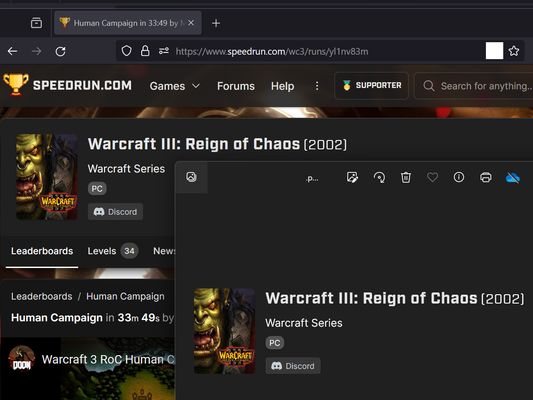


Bu uzantı hakkında
Extension User Guide
📸 1. How to Capture a Full Page
🎯 2. How to Capture a Specific Element
⚠️ 3. Known Limitations
Browser extensions are restricted by standard security architectures and cannot run on native browser pages or official extension stores.
Examples of restricted pages include:
* Official Stores: Mozilla Add-ons Store (
📸 1. How to Capture a Full Page
- Right-click anywhere on the web page to open the context menu.
- Select "Screenshot Full Page" from the list.
🎯 2. How to Capture a Specific Element
- Click the extension icon in your browser toolbar.
- Move your mouse over the specific web element you want to capture. A red selection box will highlight the targeted area.
- Left-click the element. The extension will automatically capture the highlighted area and download it as a
.pngfile.
⏳ Note: Capturing larger web elements or extensive sections may take a few moments to process and download.
⚠️ 3. Known Limitations
Browser extensions are restricted by standard security architectures and cannot run on native browser pages or official extension stores.
Examples of restricted pages include:
* Official Stores: Mozilla Add-ons Store (
addons.mozilla.org).2 inceleyiciden 5 puan aldı
İzinler ve veriler
Gerekli izinler:
- Size bildirim gösterme
- Tarayıcı sekmelerine erişme
- Tüm web sitelerine ait verilerinize erişme
Veri toplama:
- Geliştirici, bu uzantının veri toplamaya gerek duymadığını söylüyor.
Daha fazla bilgi
- Eklenti bağlantıları
- Sürüm
- 2026.5.30.1
- Boyut
- 12,11 KB
- Son güncelleme
- bir ay önce (30 May 2026)
- İlgili kategoriler
- Sürüm geçmişi
- Etiketler
- Koleksiyona ekle