
Souffleur geliştiren: Tingler
Efficiently manage and access prompts for Large Language Models like ChatGPT, Claude, and Gemini. Streamline your AI interactions with quick prompt retrieval and customization.
9 kullanıcı9 kullanıcı
Uzantı meta verileri
Ekran görüntüleri
Bu uzantı hakkında
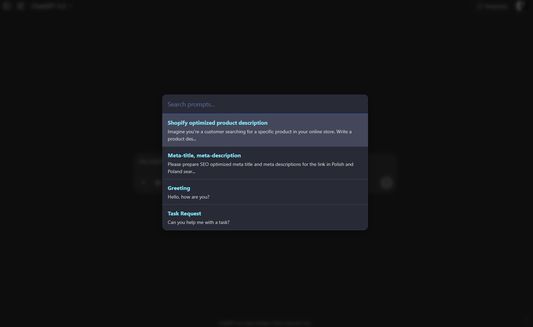
A Firefox extension for managing and quickly accessing prompts for Large Language Models with a MacOS Spotlight-like interface.
Features
How to Use
Keyboard Shortcuts
(You can customize these shortcuts by navigating to
Features
- MacOS Spotlight-like Interface: Press
Ctrl+Shift+Uto open a spotlight-style overlay in the middle of the viewport. - Chatbot Agnostic: Works on any website, not just specific LLM platforms.
- Clipboard Integration: Selected prompts are copied to clipboard instead of being inserted into input fields.
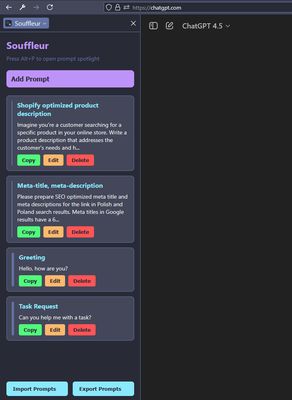
- Prompt Management: Add, edit, delete, and reorder prompts through the Firefox Sidebar
- Import/Export: Import and export your prompts as JSON files
- Improved UX (v4.7): Spotlight overlay closes instantly upon prompt selection, with a brief "Prompt Copied!" feedback message shown. Focus returns to the previously active element.
- Manifest V3: Updated core using Manifest V3 with Firefox-compatible APIs.
How to Use
- Add Prompts: Open the Sidebar (click the extension icon or press Ctrl+Shift+L) and add your prompts.
- Access Prompts: Press Alt+P to open the spotlight overlay, search for a prompt, and press Enter to copy it to clipboard.
- Manage Prompts: Use the Sidebar to edit, delete, or reorder your prompts.
- Import/Export: Use the buttons at the bottom of the Sidebar to import or export your prompts as JSON.
Keyboard Shortcuts
Ctrl+Alt+P: Toggle the SidebarAlt+P: Open the spotlight overlay
(You can customize these shortcuts by navigating to
about:addons, clicking the gear icon ⚙️, and selecting "Manage Extension Shortcuts".)0 inceleyiciden 0 puan aldı
İzinler ve veriler
Gerekli izinler:
- Panoya veri girişi
- Tarayıcı sekmelerine erişme
- Tüm web sitelerine ait verilerinize erişme
İsteğe bağlı izinler:
- Tüm web sitelerine ait verilerinize erişme
Daha fazla bilgi
- Eklenti bağlantıları
- Sürüm
- 4.7.7
- Boyut
- 58,98 KB
- Son güncelleme
- 9 ay önce (23 Tem 2025)
- İlgili kategoriler
- Lisans
- MIT Lisansı
- Sürüm geçmişi
- Koleksiyona ekle