
Tab Extract geliştiren: Monting
A simple & lightweight tool to reduce tab clutter, using just the address bar.
23 kullanıcı23 kullanıcı
Uzantı meta verileri
Ekran görüntüleri
Bu uzantı hakkında
● Too many disorganized tabs open?
● Slow to find the tab you're looking for?
● Want to reduce tab and window clutter quickly?
Tab Extract helps you easily re-organize your tabs according to the subject or site,
or quickly find a tab, or easily remove multiple tabs.
NEW FEATURES:
- Extract tabs playing sound!
- Turn on/off pinned tab extraction.
How it works:
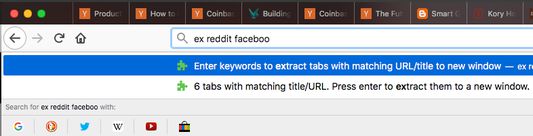
Tab Extract will move all tabs from any window with a keyword match (in their URL or page title), into a new window.
To use, type "ex" followed by a tab/space into the address bar, then enter keywords.
✓ "ex facebook news"
will extract all facebook tabs and any tab with "news" or "facebook" in their title or URL, into a new window.
✓ "ex ."
merges all tabs into the same window. This works because all URLs have a "." in them.
✓ "ex youtube -a" (or "--audio", "--audible")
will extract only the YouTube tabs that are currently playing sound.
✓ Batch-remove tabs by extracting tabs to a new window using Tab Extract, and then closing the window.
✓ Tab Extract can merge tabs from across different windows into the same window by using a common keyword amongst the tabs.
Notes: There is no need to select anything in the auto complete box, just press enter.
If your browser has saved some "ex <keyword>" as a search term for autocomplete, clear your history.
Version 1.6.0 release notes:
● Slow to find the tab you're looking for?
● Want to reduce tab and window clutter quickly?
Tab Extract helps you easily re-organize your tabs according to the subject or site,
or quickly find a tab, or easily remove multiple tabs.
NEW FEATURES:
- Extract tabs playing sound!
- Turn on/off pinned tab extraction.
How it works:
Tab Extract will move all tabs from any window with a keyword match (in their URL or page title), into a new window.
To use, type "ex" followed by a tab/space into the address bar, then enter keywords.
✓ "ex facebook news"
will extract all facebook tabs and any tab with "news" or "facebook" in their title or URL, into a new window.
✓ "ex ."
merges all tabs into the same window. This works because all URLs have a "." in them.
✓ "ex youtube -a" (or "--audio", "--audible")
will extract only the YouTube tabs that are currently playing sound.
✓ Batch-remove tabs by extracting tabs to a new window using Tab Extract, and then closing the window.
✓ Tab Extract can merge tabs from across different windows into the same window by using a common keyword amongst the tabs.
Notes: There is no need to select anything in the auto complete box, just press enter.
If your browser has saved some "ex <keyword>" as a search term for autocomplete, clear your history.
Version 1.6.0 release notes:
Support for extracting audio-playing tabs
  - Added -a, --audio, and --audible flags to target active media/sound tabs
  - Flags can be combined with search keywords (e.g. "ex youtube -a")

Settings Options Page
  - Added a configuration page to toggle whether to extract pinned tabs or not
5 inceleyiciden 3 puan aldı
İzinler ve veriler
Daha fazla bilgi
- Eklenti bağlantıları
- Sürüm
- 1.6.3
- Boyut
- 24,85 KB
- Son güncelleme
- 2 ay önce (27 Haz 2026)
- İlgili kategoriler
- Lisans
- Tüm hakları saklıdır
- Sürüm geçmişi
- Koleksiyona ekle