abcTajpu bởi Aaron Irvine
Type in accented letters, international characters, symbols or emojis into Firefox either by using a context menu (there being support for many languages) or by a customizable popup dialogue.
414 người dùng414 người dùng
Siêu dữ liệu mở rộng
Ảnh chụp màn hình
Về tiện ích mở rộng này
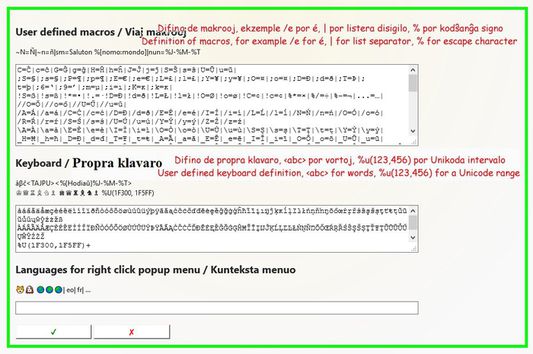
The extension "abcTajpu" (a b c type-oo) offers a number of ways to enter the non-ASCII letters from various European (and some other) languages. The simplest way to type an accented letter, when you're in a text field of a web page, is to press green the abcTajpu icon. It's also possible to right click a text field of a web page and follow the abcTajpu menu. To configure "abcTajpu" and create your own macros, keyboard layout, or content menu, go to the options tab under about:addons.
So, by pressing alt-k the Abctajpu popup will appear, and if the ⚡ checkbox is ticked then you go straight to the first text entry box (for macros) and there you can enter a valid macro so the popup automatically closes and the macro expansion is inserted into the page. For example if the Abctajpu options define macro c=ĉ and the popup's ⚡ is ticked, then typing alt-k c in a web page will insert a ĉ. If the option 📋 is ticked then rather than being copied into the page, the letter is copied to the clipboard.
The key alt-X provides a reduced set of alt-k functions, but without the need for the popup dialogue or the right-click menu. So on a text input field in a webpage it is possible to type for example c alt-x so that ĉ is entered.
So, by pressing alt-k the Abctajpu popup will appear, and if the ⚡ checkbox is ticked then you go straight to the first text entry box (for macros) and there you can enter a valid macro so the popup automatically closes and the macro expansion is inserted into the page. For example if the Abctajpu options define macro c=ĉ and the popup's ⚡ is ticked, then typing alt-k c in a web page will insert a ĉ. If the option 📋 is ticked then rather than being copied into the page, the letter is copied to the clipboard.
The key alt-X provides a reduced set of alt-k functions, but without the need for the popup dialogue or the right-click menu. So on a text input field in a webpage it is possible to type for example c alt-x so that ĉ is entered.
Được xếp hạng 3,1 (bởi 1 người dùng)
Quyền hạn và dữ liệu
Quyền hạn bắt buộc:
- Nhận dữ liệu từ bộ nhớ tạm
- Nhập dữ liệu vào bộ nhớ tạm
- Truy cập các thẻ trên trình duyệt
- Truy cập dữ liệu của bạn trên mọi trang web
Thêm thông tin
- Liên kết tiện ích
- Phiên bản
- 2.6
- Kích cỡ
- 55,38 KB
- Cập nhật gần nhất
- 4 năm trước (5 Thg 06 2022)
- Thể loại có liên quan
- Giấy phép
- Mozilla Public License 1.1
- Lịch sử các phiên bản
- Thêm vào bộ sưu tập