
CF Fetcher bởi Mohabbat
Fetch your Codeforces accepted submissions and generate a README.md file for your GitHub repository
2 người dùng2 người dùng
Siêu dữ liệu mở rộng
Ảnh chụp màn hình


Về tiện ích mở rộng này
Fetch your Codeforces accepted submissions and generate a README.md file for your GitHub repository
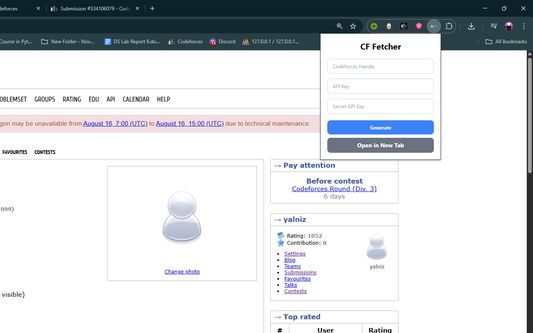
Codeforces Submission Fetcher is a simple Chrome extension that lets you fetch your latest Codeforces accepted submissions, generate a README.md in a beautiful tabular format, and upload it to your GitHub repository.
Features
- Fetch your latest Codeforces accepted solutions.
- Automatically format results into a clean and organized table.
- Generate a ready-to-use README.md file.
- Option to upload directly to your GitHub repository.
- Works entirely in your browser — no external server needed.
Usage
- Get API Keys: Go to Codeforces Settings → API and generate keys
- Open Extension: Click the CF Fetcher icon in your browser
- Enter Details: Add your handle, API key, and secret key
- Generate: Click "Generate" to create your ZIP file
- Download: The file will download automatically
- Unzip: Extract the contents of the ZIP file
- Upload: Upload the extracted files to your GitHub repository
How It Works
1. Enter your Codeforces handle, API key, and secret key.
2. Click "Generate".
3. Download your auto-generated README.md and upload it to GitHub.
4. Share your competitive programming achievements with the world!
Privacy
Your API credentials are only used locally in your browser. Nothing is stored or sent to third-party servers.
Created with with ❤️ for competitive programmers.
Codeforces Submission Fetcher is a simple Chrome extension that lets you fetch your latest Codeforces accepted submissions, generate a README.md in a beautiful tabular format, and upload it to your GitHub repository.
Features
- Fetch your latest Codeforces accepted solutions.
- Automatically format results into a clean and organized table.
- Generate a ready-to-use README.md file.
- Option to upload directly to your GitHub repository.
- Works entirely in your browser — no external server needed.
Usage
- Get API Keys: Go to Codeforces Settings → API and generate keys
- Open Extension: Click the CF Fetcher icon in your browser
- Enter Details: Add your handle, API key, and secret key
- Generate: Click "Generate" to create your ZIP file
- Download: The file will download automatically
- Unzip: Extract the contents of the ZIP file
- Upload: Upload the extracted files to your GitHub repository
How It Works
1. Enter your Codeforces handle, API key, and secret key.
2. Click "Generate".
3. Download your auto-generated README.md and upload it to GitHub.
4. Share your competitive programming achievements with the world!
Privacy
Your API credentials are only used locally in your browser. Nothing is stored or sent to third-party servers.
Created with with ❤️ for competitive programmers.
Được xếp hạng 0 (bởi 1 người dùng)
Quyền hạn và dữ liệu
Thêm thông tin
- Liên kết tiện ích
- Phiên bản
- 1.1.0
- Kích cỡ
- 163,03 KB
- Cập nhật gần nhất
- 6 tháng trước (23 Thg 08 2025)
- Thể loại có liên quan
- Giấy phép
- Giấy phép MIT
- Chính sách riêng tư
- Đọc chính sách riêng tư của tiện ích này
- Lịch sử các phiên bản
- Thêm vào bộ sưu tập