
Conex bởi kesselborn
TabGroups married with Tab Containers and bookmark & history search
694 người dùng694 người dùng
Siêu dữ liệu mở rộng
Ảnh chụp màn hình
Về tiện ích mở rộng này
conex
This addon tries to replace some functionality from the discontinued *TabGroups* with some differences:
Differences to tabgroups
Global keyboard shortcuts
Conex popup keyboard shortcuts
Enable tab hiding
Necessary addon permissions
This addon tries to replace some functionality from the discontinued *TabGroups* with some differences:
Differences to tabgroups
- it lacks the big "Manage my TabGroups" overview window
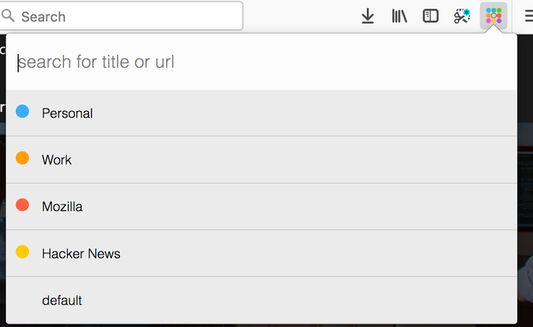
- tab groups are implemented via containers
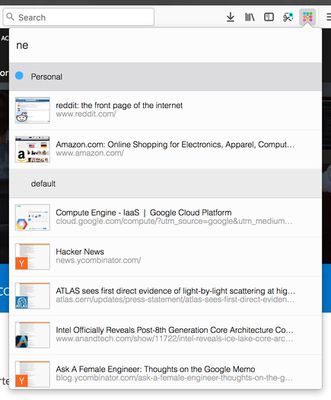
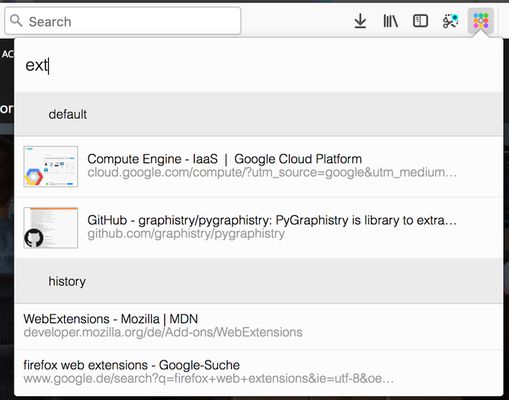
- the quick search contains thumbnail of the results
- the quick search includes bookmarks and history
Global keyboard shortcuts
Ctrl+Space (adjustable): open conex popupCtrl+Shift+E / Cmd+Shift+E (adjustable): move tab to another containerCtrl+T / Cmd+T: open tab in current container
Conex popup keyboard shortcuts
↓/Tabjump to next container or tab in the popup list↑/Shift+Tabjump to previous container or tab in the popup listEnteron a tab: switch to tab / on a container: activate the last accessed tab of the selected containerBackspaceon a tab: close the selected tab / on a container: delete selected container→/←/Ctrl+Enteron a container: expand / unexpand tab list of the selected containerCtrl+Shift+Enter/Ctrl+ +on a container: open a new tab in the selected container and activate this tab / in the search box: open new container dialog
Enable tab hiding
Necessary addon permissions
- <all_url> : for taking screenshots for the thumbnails during search
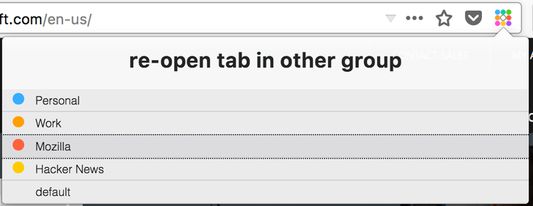
- activeTab (optional) : necessary in order to show a dialog, where the user can select the container to open external links
- bookmarks (optional) : for searching in bookmarks
- contextMenus : for context menu for moving tab to a different container
- contextualIdentities : for working with tab containers
- cookies : for working with tab containers
- history (optional) : for showing history results in quick search
- menus : for creating context menus when moving tabs
- notifications (optional) : to show a warning if the tabhiding is not activated
- storage : for storing thumbnails
- tabs : for tab handling
- tabHide : for hiding and showing tabs
- webNavigation : for intercepting and reacting on new tabs
- webRequest : necessary in order to show a dialog, where the user can select the container to open external links
- webRequestBlocking : necessary in order to show a dialog, where the user can select the container to open external links
Được xếp hạng 4,4 (bởi 1 người dùng)
Quyền hạn và dữ liệu
Quyền hạn bắt buộc:
- Truy cập các thẻ trên trình duyệt
- Truy cập hoạt động của trình duyệt trong khi điều hướng
- Truy cập dữ liệu của bạn trên mọi trang web
Quyền hạn tùy chọn:
- Xem và chỉnh sửa trang đánh dấu
- Truy cập lịch sử duyệt web
- Hiển thị thông báo cho bạn
- Ẩn và hiện các thẻ trên trình duyệt
Thêm thông tin
- Liên kết tiện ích
- Phiên bản
- 0.9.8resigned1
- Kích cỡ
- 112,16 KB
- Cập nhật gần nhất
- 2 năm trước (25 Thg 04 2024)
- Giấy phép
- Mozilla Public License 2.0
- Lịch sử các phiên bản
- Thêm vào bộ sưu tập