Tiện ích trình duyệt Firefox
Tiện ích mở rộng
Chủ đề
Xem thêm…
cho Firefox
Từ điển & gói ngôn ngữ
Các trang web trình duyệt khác
Tiện ích cho Android
Đăng nhập
Tìm kiếm
Tìm kiếm
Content Edit & Blur
bởi
Hasan Abo-Shally
Easily edit or blur elements on any webpage
4 (4 đánh giá)
4 (4 đánh giá)
93 người dùng
93 người dùng
Tải xuống Firefox và tải tiện ích mở rộng
Tải xuống tập tin
Siêu dữ liệu mở rộng
Ảnh chụp màn hình
Về tiện ích mở rộng này
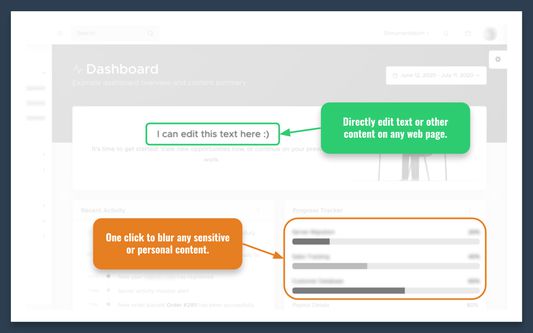
Install this extension to directly edit text or content on any webpage and to blur sensitive/personal data, when sharing screenshots for example.
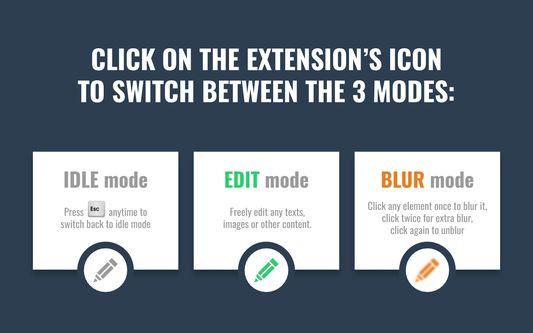
-- Click on the extension’s icon to switch between the 3 modes: Idle, Edit, Blur.
-- In Blur mode: Click any element once to blur it, click twice for extra blur, click again to unblur.
-- In Edit mode: Double-click any image to replace it
-- Press the ESC key anytime to switch back to Idle mode
Được xếp hạng 4 (bởi 1 người dùng)
Đăng nhập để đánh giá tiện ích này
Chưa có xếp hạng nào
Đã lưu xếp hạng sao
5
3
4
0
3
0
2
0
1
1
Thêm thông tin
Liên kết tiện ích
Trang chủ
Trang hỗ trợ
Email hỗ trợ
Phiên bản
1.3.0
Kích cỡ
21,37 KB
Cập nhật gần nhất
5 năm trước (4 Thg 11 2020)
Thể loại có liên quan
Phát triển Web
Diện mạo
Giấy phép
Mozilla Public License 2.0
Lịch sử các phiên bản
Xem tất cả phiên bản
Thêm vào bộ sưu tập
Chọn một bộ sưu tập...
Tạo bộ sưu tập mới
Báo cáo tiện ích này