
Corporate Action Tracker bởi Mich De
Track stock splits, tender offers, dividends, mergers, acquisitions, spinoffs, rights issues and more from SEC and news sources.
1 người dùng1 người dùng
Siêu dữ liệu mở rộng
Ảnh chụp màn hình

Về tiện ích mở rộng này
Overview
Corporate Action Tracker is a Chrome extension designed to help investors and researchers track and manage key corporate actions—such as splits, dividends, mergers, acquisitions, spinoffs, rights issues, and tender offers—directly from SEC filings and news sources. This tool streamlines the process of recording, organizing, and reviewing important events for any stock, making it easier to stay informed and make timely decisions.
Key Features
Track All Major Corporate Actions:
Save and categorize events including Dividends, Splits, Mergers, Acquisitions, Spinoffs, Rights Issues, and Tender Offers.
Quick Add from Any Page:
Use the extension popup or context menu to quickly add a new action for any stock you’re researching.
Custom Notes and Tags:
Add your own notes and tags to each entry for easy searching and organization.
Edit and Remove Entries:
Update or delete saved actions as new information becomes available.
Powerful Search and Filter:
Instantly search by symbol, action type, tags, or notes. Filter by action type for focused review.
Data Privacy:
All data is stored locally in your browser—nothing is sent to external servers.
How to Use
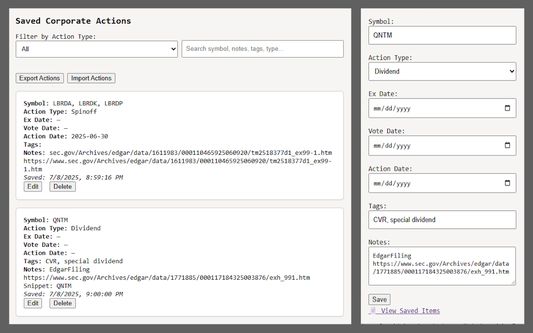
1. Adding a New Corporate Action
Click the extension icon in your Chrome toolbar.
Fill in the form:
Symbol: Enter the stock ticker (e.g., AAPL).
Action Type: Select from Dividends, Splits, Mergers, Acquisitions, Spinoffs, Rights Issues, or Tender Offers.
Ex Date, Vote Date, Action Date: Enter relevant dates (optional).
Tags: Add keywords for easy searching (comma separated).
Notes: Add any details or context.
Click Save. The action is now stored locally.
Use the search bar to find actions by symbol, type, tags, or notes.
Use the Action Type filter to focus on a specific category.
Click Edit to update any entry, or Delete to remove it.
Click Edit to open an inline form, make changes, and save.
Click Delete to remove the entry permanently.
Example Use Cases
Dividend Investors: Track upcoming ex-dividend dates and payment details.
Event-Driven Traders: Monitor splits, mergers, and tender offers for trading opportunities.
Portfolio Managers: Maintain a record of all relevant corporate actions for your holdings.
Researchers: Annotate and tag actions for future reference or reporting.
Frequently Asked Questions
Q: Where is my data stored?
A: All data is stored locally in your browser using Chrome’s storage. No information is sent to any server.
Q: Can I export my data?
A: Export functionality is not included in the current version, but you can request this feature via the support email.
Q: Does the extension work offline?
A: Yes, all features work offline since data is stored locally.
Privacy
No data is collected, sold, or shared.
The extension does not access or transmit your browsing history or personal information.
Tips for Best Use
Use clear, consistent tags for easy searching (e.g., “Q2 dividend”, “2025 split”).
Regularly review and update your saved actions as new information becomes available.
Use the filter and search features to quickly find relevant actions during earnings season or major market events.
Get started by installing Corporate Action Tracker and take control of your corporate action research today!
Corporate Action Tracker is a Chrome extension designed to help investors and researchers track and manage key corporate actions—such as splits, dividends, mergers, acquisitions, spinoffs, rights issues, and tender offers—directly from SEC filings and news sources. This tool streamlines the process of recording, organizing, and reviewing important events for any stock, making it easier to stay informed and make timely decisions.
Key Features
Track All Major Corporate Actions:
Save and categorize events including Dividends, Splits, Mergers, Acquisitions, Spinoffs, Rights Issues, and Tender Offers.
Quick Add from Any Page:
Use the extension popup or context menu to quickly add a new action for any stock you’re researching.
Custom Notes and Tags:
Add your own notes and tags to each entry for easy searching and organization.
Edit and Remove Entries:
Update or delete saved actions as new information becomes available.
Powerful Search and Filter:
Instantly search by symbol, action type, tags, or notes. Filter by action type for focused review.
Data Privacy:
All data is stored locally in your browser—nothing is sent to external servers.
How to Use
1. Adding a New Corporate Action
Click the extension icon in your Chrome toolbar.
Fill in the form:
Symbol: Enter the stock ticker (e.g., AAPL).
Action Type: Select from Dividends, Splits, Mergers, Acquisitions, Spinoffs, Rights Issues, or Tender Offers.
Ex Date, Vote Date, Action Date: Enter relevant dates (optional).
Tags: Add keywords for easy searching (comma separated).
Notes: Add any details or context.
Click Save. The action is now stored locally.
- Viewing and Managing Saved Actions
Click “View Saved Items” in the popup, or open the viewer page.
Use the search bar to find actions by symbol, type, tags, or notes.
Use the Action Type filter to focus on a specific category.
Click Edit to update any entry, or Delete to remove it.
- Editing or Deleting an Entry
In the viewer, each saved action has Edit and Delete buttons.
Click Edit to open an inline form, make changes, and save.
Click Delete to remove the entry permanently.
Example Use Cases
Dividend Investors: Track upcoming ex-dividend dates and payment details.
Event-Driven Traders: Monitor splits, mergers, and tender offers for trading opportunities.
Portfolio Managers: Maintain a record of all relevant corporate actions for your holdings.
Researchers: Annotate and tag actions for future reference or reporting.
Frequently Asked Questions
Q: Where is my data stored?
A: All data is stored locally in your browser using Chrome’s storage. No information is sent to any server.
Q: Can I export my data?
A: Export functionality is not included in the current version, but you can request this feature via the support email.
Q: Does the extension work offline?
A: Yes, all features work offline since data is stored locally.
Privacy
No data is collected, sold, or shared.
The extension does not access or transmit your browsing history or personal information.
Tips for Best Use
Use clear, consistent tags for easy searching (e.g., “Q2 dividend”, “2025 split”).
Regularly review and update your saved actions as new information becomes available.
Use the filter and search features to quickly find relevant actions during earnings season or major market events.
Get started by installing Corporate Action Tracker and take control of your corporate action research today!
Được xếp hạng 0 (bởi 1 người dùng)
Quyền hạn và dữ liệu
Quyền hạn bắt buộc:
- Hiển thị thông báo cho bạn
- Truy cập dữ liệu của bạn trên mọi trang web
Thêm thông tin
- Phiên bản
- 1.0.2
- Kích cỡ
- 18,86 KB
- Cập nhật gần nhất
- 6 tháng trước (18 Thg 07 2025)
- Thể loại có liên quan
- Giấy phép
- Mọi Quyền Được Bảo Lưu
- Lịch sử các phiên bản
- Thêm vào bộ sưu tập