InstaCalc bởi Laz H
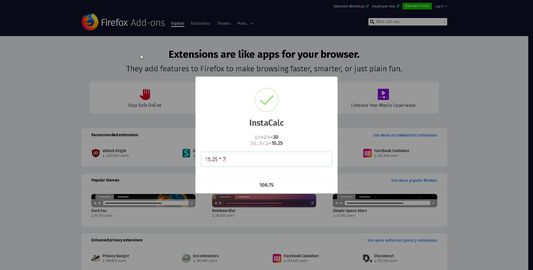
InstaCalc is the worlds simplest to use calculator extension for your browser. Begin typing an expression when you are on a page (yes, any page online), and a window will automatically pop up showing the problem and answer!
1 người dùng1 người dùng
Siêu dữ liệu mở rộng
Ảnh chụp màn hình
Về tiện ích mở rộng này
InstaCalc is the worlds simplest to use calculator extension for your browser.
If you need quick calculations when you browse the web, then it doesn’t get any easier.
Begin typing an expression when you are on a page (yes, any page online), and a window will automatically pop up showing the problem and answer!
Example:
You are on your favorite shopping website and see that espresso maker you’re thinking about buying for $249 free shipping. But there is another machine you’re considering for $321, plus $8.14 shipping and you want to quickly figure out the difference... Just start typing:
321+8.14-249 and a box will pop up with the result = 80.14
Want a running tape of your inputs while keeping InstaCalc visible?
Hit the “=“ key.
Happy with your answer?
Hit the Return (enter) key to get back to browsing, or press the 'c' key to first copy your answer then get back to browsing. That’s it.
No flipping between a calculator app and your browser, you don’t even have to click an icon. Just start typing.
If you need quick calculations when you browse the web, then it doesn’t get any easier.
Begin typing an expression when you are on a page (yes, any page online), and a window will automatically pop up showing the problem and answer!
Example:
You are on your favorite shopping website and see that espresso maker you’re thinking about buying for $249 free shipping. But there is another machine you’re considering for $321, plus $8.14 shipping and you want to quickly figure out the difference... Just start typing:
321+8.14-249 and a box will pop up with the result = 80.14
Want a running tape of your inputs while keeping InstaCalc visible?
Hit the “=“ key.
Happy with your answer?
Hit the Return (enter) key to get back to browsing, or press the 'c' key to first copy your answer then get back to browsing. That’s it.
No flipping between a calculator app and your browser, you don’t even have to click an icon. Just start typing.
Được xếp hạng 3 (bởi 1 người dùng)
Quyền hạn và dữ liệu
Thêm thông tin
- Liên kết tiện ích
- Phiên bản
- 1.0
- Kích cỡ
- 104,51 KB
- Cập nhật gần nhất
- 6 năm trước (12 Thg 08 2019)
- Thể loại có liên quan
- Giấy phép
- Chỉ Giấy phép Công cộng GNU v3.0
- Lịch sử các phiên bản
- Thêm vào bộ sưu tập