Tiện ích trình duyệt Firefox
  • Tiện ích mở rộng
  • Chủ đề
    • cho Firefox
    • Từ điển & gói ngôn ngữ
    • Các trang web trình duyệt khác
    • Tiện ích cho Android
Đăng nhập
Xem trước QR Issue Card Printer PRO for Jira Cloud

QR Issue Card Printer PRO for Jira Cloud bởi MrAddon

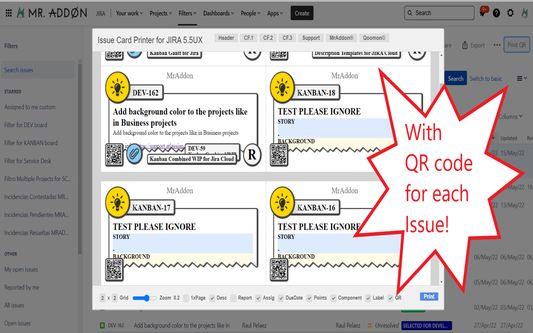
Print your filters and issues with a single click, with a configurable and beautiful layout.Show a large QR code in each card to quickly locate your tickets.Now you can also print from your Kanban or Scrum board and from your backlog view!New feature

Thử nghiệmThử nghiệm
0 (0 đánh giá)0 (0 đánh giá)
2 người dùng2 người dùng
Tải xuống Firefox và tải tiện ích mở rộng
Tải xuống tập tin

Siêu dữ liệu mở rộng

Ảnh chụp màn hình
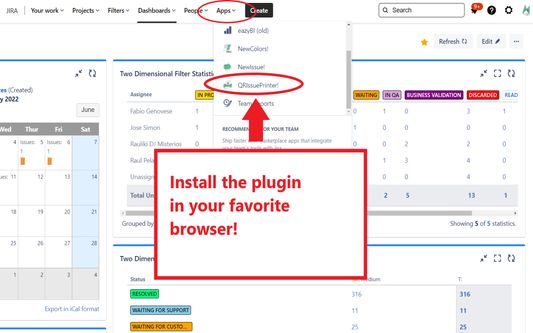
Install the add-on in your favorite browser!
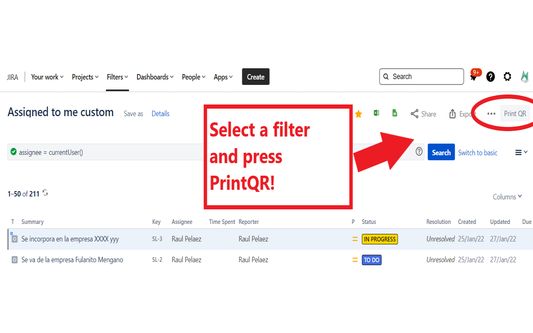
Go to Apps → QRIssuePrinter! and install the add-on in your favorite browserPush PrintQR! button in issues, filters or boards
That’s all! Now take a look in your Issues, Filters and Kanban/SCRUM boards and backlogs and you will see a new button “Print QR”Ready to print in one click!!
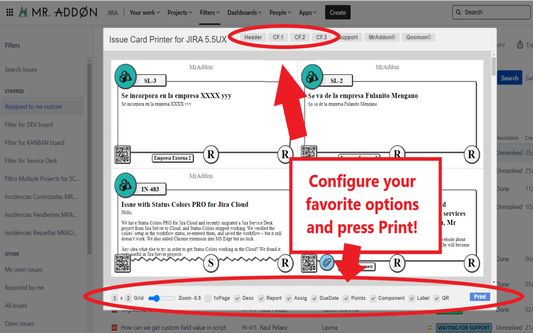
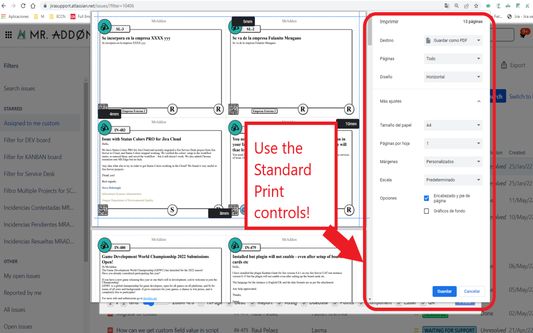
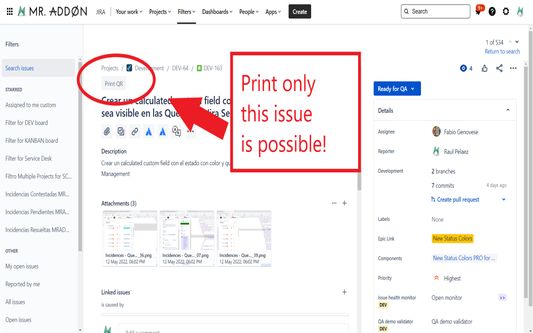
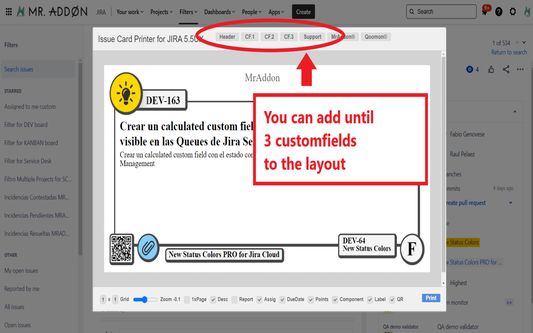
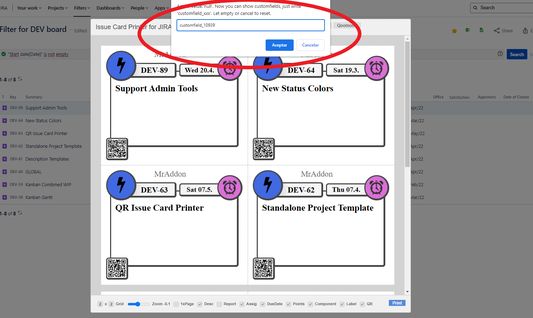
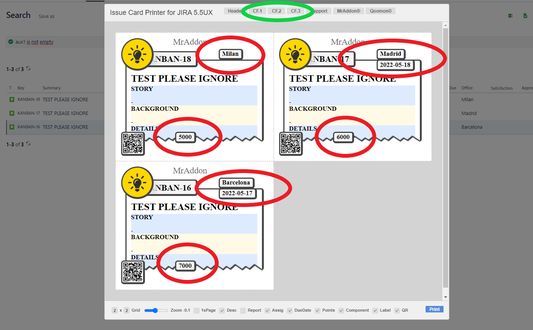
After press the “Print QR” button you will see a beatiful cards ready to print in one click!!Just configure the final part, page margins and Save it as PDF or just print in your usual printer!Now we can configure show/hide the system fields of Jira, we have a Zoom control and grid control, also of course, the QR code.If you need to print only one issue, it’s possible of course! Search the “Print QR” button and that’s all!Click in CF1 or CF2 or CF3 buttons and add the “customfield_xxxx” value where “xxxx” is the ID of the customfieldClick in CF1 or CF2 or CF3 buttons and add the “customfield_xxxx” value where “xxxx” is the ID of the customfieldClick in CF1 or CF2 or CF3 buttons and add the “customfield_xxxx” value where “xxxx” is the ID of the customfield
Về tiện ích mở rộng này
Print your filters and issues with a single click, with a configurable and beautiful layout.Show a large QR code in each card to quickly locate your tickets.Now you can also print from your Kanban or Scrum board and from your backlog view!New features coming soon!

Install the add-on in your favorite browser!
Go to Apps → QRIssuePrinter! and install the add-on in your favorite browser

Push PrintQR! button in issues, filters or boards
That’s all! Now take a look in your Issues, Filters and Kanban/SCRUM boards and backlogs and you will see a new button “Print QR”

Ready to print in one click!!
After press the “Print QR” button you will see a beatiful cards ready to print in one click!!

Vide summary: https://www.youtube.com/watch?v=AVp7n4f4qUk
Được xếp hạng 0 (bởi 1 người dùng)
Đăng nhập để đánh giá tiện ích này
Chưa có xếp hạng nào

Đã lưu xếp hạng sao

5
0
4
0
3
0
2
0
1
0
Chưa có đánh giá
Quyền hạn và dữ liệu

Quyền hạn bắt buộc:

  • Truy cập dữ liệu của bạn cho các trang web trong tên miền atlassian.net
  • Truy cập dữ liệu của bạn cho các trang web trong tên miền jira.com

Quyền hạn tùy chọn:

  • Truy cập dữ liệu của bạn cho các trang web trong tên miền atlassian.net
  • Truy cập dữ liệu của bạn cho các trang web trong tên miền jira.com
Tìm hiểu thêm
Thêm thông tin
Liên kết tiện ích
  • Trang chủ
  • Trang hỗ trợ
  • Email hỗ trợ
Phiên bản
7.3.0
Kích cỡ
170,84 KB
Cập nhật gần nhất
10 ngày trước (18 Thg 12 2025)
Thể loại có liên quan
  • Phát triển Web
Giấy phép
Mozilla Public License 2.0
Lịch sử các phiên bản
  • Xem tất cả phiên bản
Thêm vào bộ sưu tập
Báo cáo tiện ích này
Đi đến trang chủ Mozilla

Tiện ích

  • Giới thiệu
  • Blog tiện ích Firefox
  • Extension Workshop
  • Trung tâm nhà phát triển
  • Chính sách nhà phát triển
  • Blog cộng đồng
  • Diễn đàn
  • Báo cáo một lỗi
  • Hướng dẫn đánh giá

Trình duyệt

  • Desktop
  • Mobile
  • Enterprise

Sản phẩm

  • Browsers
  • VPN
  • Relay
  • Monitor
  • Pocket
  • Bluesky (@firefox.com)
  • Instagram (Firefox)
  • YouTube (firefoxchannel)
  • Riêng tư
  • Cookie
  • Pháp lý

Trừ trường hợp khác đã ghi chú, nội dung trên trang này được cấp phép theo giấy phép Creative Commons Attribution Share-Alike v3.0 hoặc bất kỳ phiên bản nào sau này.