
MemoInjo bởi Ben Lau
Stick memo on any website and sync via Joplin
Siêu dữ liệu mở rộng
Ảnh chụp màn hình
Về tiện ích mở rộng này
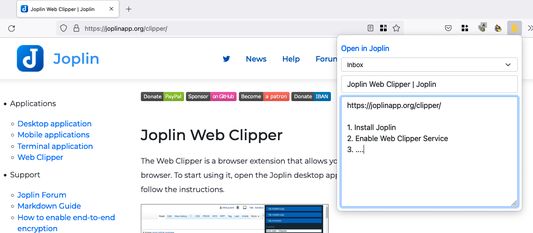
MemoInjo is an extension that sticks a memo on any website and stores/sync via Joplin. Simply press the icon of MemoInjo at the extension toolbar (top-right corner) in the browser. It will show a memo editor for the browsing website. You may create a summary or a task list associated with a website easily.
MemoInjo is not a web clipper that could capture only once. You could reopen the same memo for the same URL. And thank to the sync feature of Joplin, you may access the memo across different computer.
Setup
1. Install the extension
2. Open Joplin
3. Go to Web Clipper Options and follow the instruction.
4. In the toolbar of the browser, press the button of MemoInjo
5. It will ask you to grant permission in Joplin.
6. Switch back to Joplin and grant the permission.
Then it is ready to use.
MemoInjo is not a web clipper that could capture only once. You could reopen the same memo for the same URL. And thank to the sync feature of Joplin, you may access the memo across different computer.
Setup
1. Install the extension
2. Open Joplin
3. Go to Web Clipper Options and follow the instruction.
4. In the toolbar of the browser, press the button of MemoInjo
5. It will ask you to grant permission in Joplin.
6. Switch back to Joplin and grant the permission.
Then it is ready to use.
Được xếp hạng 5 (bởi 1 người dùng)
Thêm thông tin
- Liên kết tiện ích
- Phiên bản
- 0.1.3
- Kích cỡ
- 2 MB
- Cập nhật gần nhất
- 4 năm trước (23 Thg 04 2022)
- Thể loại có liên quan
- Giấy phép
- Giấy phép MIT
- Lịch sử các phiên bản
- Thêm vào bộ sưu tập