
Shade bởi Praneet Loke
A privacy shade for your tabs. Use this extension to quickly mask the contents of your tab, especially if you are screensharing.
5 người dùng5 người dùng
Siêu dữ liệu mở rộng
Ảnh chụp màn hình
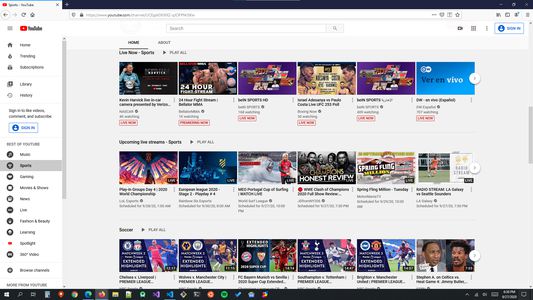
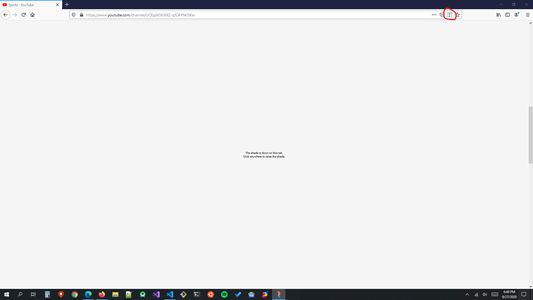
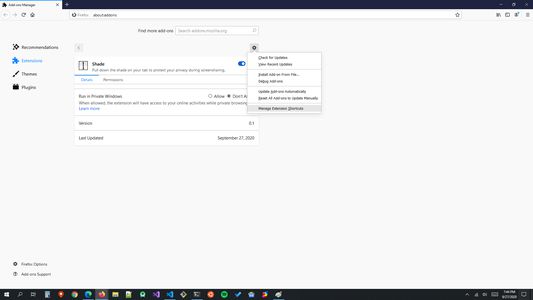
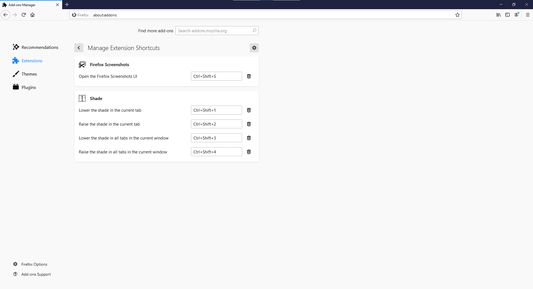
Về tiện ích mở rộng này
Have you ever accidentally revealed a bit too much about what you were browsing during a screensharing session? Or someone's coming over to your desk to discuss something and want to quickly mask your tabs? Then this extension is for you! It allows you to pull down a shade on any of your tab(s) in the current window.
I created this extension because I often have collaborate with people from other companies and I do not want to accidentally reveal the contents of my tabs while switching tabs or windows. That's my story for why I would use this extension myself. But whatever your reason is, I am sure you wished you had a way to mask your tabs rather than close or hide them.
Shortcut Keys
The following are the default shortcut keys for actions on the "current" tab. Trouble using these shortcut keys on Windows? Check out the screenshots to learn how you can customize the shortcut keys to your liking.
Mac/Linux
Pull down the shade:
Raise the shade:
Windows
Pull down the shade:
Raise the shade:
The following are the shortcut keys for actions on "all" tabs in the current window:
Mac/Linux
Pull down the shade:
Raise the shade:
Windows
Pull down the shade:
Raise the shade:
Note: You can change the above shortcut key bindings from the extension management page in Firefox at anytime. Please see the screenshots to learn how to do that.
I created this extension because I often have collaborate with people from other companies and I do not want to accidentally reveal the contents of my tabs while switching tabs or windows. That's my story for why I would use this extension myself. But whatever your reason is, I am sure you wished you had a way to mask your tabs rather than close or hide them.
Shortcut Keys
The following are the default shortcut keys for actions on the "current" tab. Trouble using these shortcut keys on Windows? Check out the screenshots to learn how you can customize the shortcut keys to your liking.
Mac/Linux
Pull down the shade:
Ctrl+Shift+7Raise the shade:
Ctrl+Shift+8Windows
Pull down the shade:
Ctrl+Shift+1Raise the shade:
Ctrl+Shift+2The following are the shortcut keys for actions on "all" tabs in the current window:
Mac/Linux
Pull down the shade:
Ctrl+Shift+9Raise the shade:
Ctrl+Shift+0Windows
Pull down the shade:
Ctrl+Shift+3Raise the shade:
Ctrl+Shift+4Note: You can change the above shortcut key bindings from the extension management page in Firefox at anytime. Please see the screenshots to learn how to do that.
Được xếp hạng 0 (bởi 1 người dùng)
Quyền hạn và dữ liệu
Quyền hạn bắt buộc:
- Truy cập các thẻ trên trình duyệt
- Truy cập dữ liệu của bạn trên mọi trang web
Thêm thông tin
- Liên kết tiện ích
- Phiên bản
- 23.8.7.1754
- Kích cỡ
- 78,01 KB
- Cập nhật gần nhất
- 3 năm trước (7 Thg 08 2023)
- Thể loại có liên quan
- Giấy phép
- Mọi Quyền Được Bảo Lưu
- Chính sách riêng tư
- Đọc chính sách riêng tư của tiện ích này
- Lịch sử các phiên bản
- Thêm vào bộ sưu tập