PrivateSearch bởi Patrik
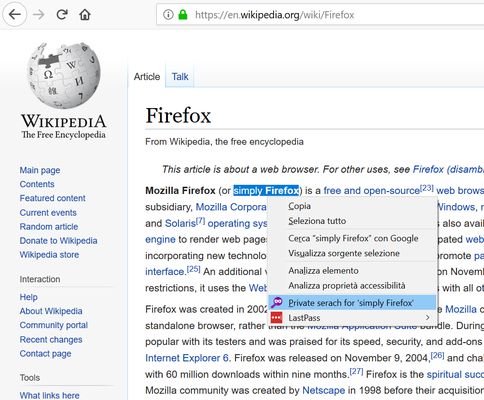
Search any text privately, with a simple right-click. The extension adds an option to the context menu to instantly open a search in a new private window, using your default search engine.
40 người dùng40 người dùng
Siêu dữ liệu mở rộng
Ảnh chụp màn hình
Về tiện ích mở rộng này
How does it work?
1. Select the text you want to search
2. Right-click on the selected text
3. Select "Private search for..."
4. A new private window will open with the search results.
No data collected, no configuration needed.
⚠️ Important
To work properly, the extension requires the "Run in Private Windows" permission. Firefox will ask you to enable it during installation; you can also do it later from the extensions settings.
1. Select the text you want to search
2. Right-click on the selected text
3. Select "Private search for..."
4. A new private window will open with the search results.
No data collected, no configuration needed.
⚠️ Important
To work properly, the extension requires the "Run in Private Windows" permission. Firefox will ask you to enable it during installation; you can also do it later from the extensions settings.
Được xếp hạng 5 (bởi 1 người dùng)
Thêm thông tin
- Phiên bản
- 1.2resigned1
- Kích cỡ
- 22,47 KB
- Cập nhật gần nhất
- 2 năm trước (26 Thg 04 2024)
- Thể loại có liên quan
- Giấy phép
- Mọi Quyền Được Bảo Lưu
- Lịch sử các phiên bản
- Thêm vào bộ sưu tập