
Tab Extract bởi Monting
A simple & lightweight tool to reduce tab clutter, using just the address bar.
19 người dùng19 người dùng
Siêu dữ liệu mở rộng
Ảnh chụp màn hình
Về tiện ích mở rộng này
● Too many disorganized tabs open?
● Slow to find the tab you're looking for?
● Want to reduce tab and window clutter quickly?
Tab Extract helps you easily re-organize your tabs according to the subject or site,
or quickly find a tab, or easily remove multiple tabs.
NEW FEATURES:
- Extract tabs playing sound!
- Turn on/off pinned tab extraction.
How it works:
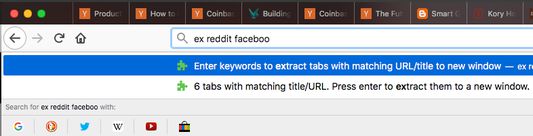
Tab Extract will move all tabs from any window with a keyword match (in their URL or page title), into a new window.
To use, type "ex" followed by a tab/space into the address bar, then enter keywords.
✓ "ex facebook news"
will extract all facebook tabs and any tab with "news" or "facebook" in their title or URL, into a new window.
✓ "ex ."
merges all tabs into the same window. This works because all URLs have a "." in them.
✓ "ex youtube -a" (or "--audio", "--audible")
will extract only the YouTube tabs that are currently playing sound.
✓ Batch-remove tabs by extracting tabs to a new window using Tab Extract, and then closing the window.
✓ Tab Extract can merge tabs from across different windows into the same window by using a common keyword amongst the tabs.
Notes: There is no need to select anything in the auto complete box, just press enter.
If your browser has saved some "ex <keyword>" as a search term for autocomplete, clear your history.
Version 1.6.0 release notes:
● Slow to find the tab you're looking for?
● Want to reduce tab and window clutter quickly?
Tab Extract helps you easily re-organize your tabs according to the subject or site,
or quickly find a tab, or easily remove multiple tabs.
NEW FEATURES:
- Extract tabs playing sound!
- Turn on/off pinned tab extraction.
How it works:
Tab Extract will move all tabs from any window with a keyword match (in their URL or page title), into a new window.
To use, type "ex" followed by a tab/space into the address bar, then enter keywords.
✓ "ex facebook news"
will extract all facebook tabs and any tab with "news" or "facebook" in their title or URL, into a new window.
✓ "ex ."
merges all tabs into the same window. This works because all URLs have a "." in them.
✓ "ex youtube -a" (or "--audio", "--audible")
will extract only the YouTube tabs that are currently playing sound.
✓ Batch-remove tabs by extracting tabs to a new window using Tab Extract, and then closing the window.
✓ Tab Extract can merge tabs from across different windows into the same window by using a common keyword amongst the tabs.
Notes: There is no need to select anything in the auto complete box, just press enter.
If your browser has saved some "ex <keyword>" as a search term for autocomplete, clear your history.
Version 1.6.0 release notes:
Support for extracting audio-playing tabs
  - Added -a, --audio, and --audible flags to target active media/sound tabs
  - Flags can be combined with search keywords (e.g. "ex youtube -a")

Settings Options Page
  - Added a configuration page to toggle whether to extract pinned tabs or not
Được xếp hạng 3 (bởi 1 người dùng)
Quyền hạn và dữ liệu
Thêm thông tin
- Liên kết tiện ích
- Phiên bản
- 1.0.5resigned1
- Kích cỡ
- 18,58 KB
- Cập nhật gần nhất
- 2 năm trước (25 Thg 04 2024)
- Thể loại có liên quan
- Giấy phép
- Mọi Quyền Được Bảo Lưu
- Lịch sử các phiên bản
- Thêm vào bộ sưu tập