
Universal Adobe Debugger bởi Bogdan Nazaruk
Adobe Analytics, AEP & Launch debugger. Inspect Web SDK, XDM & tracking calls directly in Chrome DevTools.
40 người dùng40 người dùng
Siêu dữ liệu mở rộng
Ảnh chụp màn hình



Về tiện ích mở rộng này
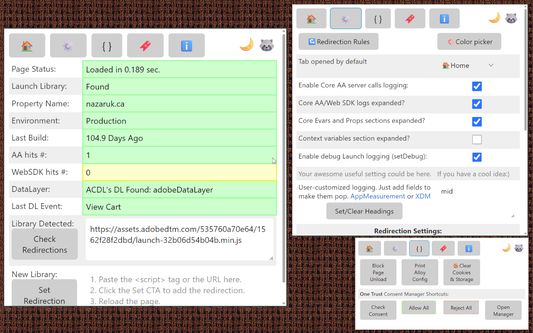
🔍 Universal Adobe Debugger: Adobe Analytics, AEP & Launch Debugging Made Simple 🦝
Universal Adobe Debugger is a powerful Chrome extension for debugging Adobe Analytics, Adobe Experience Platform (AEP), Adobe Web SDK, and Adobe Launch (Tags) implementations.
Built by analysts for analysts, this tool helps you validate tracking, inspect payloads, and troubleshoot Adobe Experience Cloud integrations directly from the browser console.
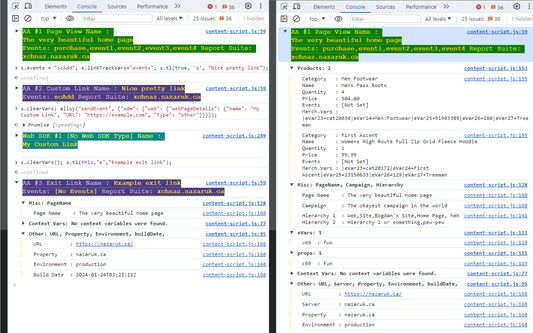
Simply open DevTools and trigger Adobe Analytics or Web SDK calls to instantly view structured, readable debugging output.
🚀 Key Features
• Adobe Analytics Debugging
Log and inspect Adobe Analytics server calls (AppMeasurement, s.t, s.tl) directly in the console for faster troubleshooting and QA validation.
• Adobe Launch (Tags) Debugging
Access rule execution details and implementation diagnostics to verify Launch configurations with ease.
• AEP Web SDK & XDM Logging
Monitor Adobe Experience Platform Web SDK requests and XDM payloads with clean, formatted console output — no more digging through nested objects.
• Library Replacement
Replace Adobe Launch libraries seamlessly to test and validate implementations in real time.
• Analytics & Consent Snippets
Access a curated collection of debugging snippets for analytics validation and consent troubleshooting.
🎯 Why Use Universal Adobe Debugger?
Validate Adobe Analytics implementations faster
Debug AEP Web SDK network requests efficiently
Verify Adobe Launch rules and data layer mappings
Improve tracking accuracy and data quality
Streamline QA workflows for analysts and developers
Whether you're an Adobe Analytics specialist, AEP implementer, Launch developer, or digital analyst, Universal Adobe Debugger helps you debug smarter and ship cleaner data.
🛠️ Contributions & Feedback
Found a bug or have a feature request? Contributions and feedback are welcome.
Visit our GitHub repository at https://github.com/cthae/Adobe-Launch-Debugger to report issues or suggest improvements.
Universal Adobe Debugger is a powerful Chrome extension for debugging Adobe Analytics, Adobe Experience Platform (AEP), Adobe Web SDK, and Adobe Launch (Tags) implementations.
Built by analysts for analysts, this tool helps you validate tracking, inspect payloads, and troubleshoot Adobe Experience Cloud integrations directly from the browser console.
Simply open DevTools and trigger Adobe Analytics or Web SDK calls to instantly view structured, readable debugging output.
🚀 Key Features
• Adobe Analytics Debugging
Log and inspect Adobe Analytics server calls (AppMeasurement, s.t, s.tl) directly in the console for faster troubleshooting and QA validation.
• Adobe Launch (Tags) Debugging
Access rule execution details and implementation diagnostics to verify Launch configurations with ease.
• AEP Web SDK & XDM Logging
Monitor Adobe Experience Platform Web SDK requests and XDM payloads with clean, formatted console output — no more digging through nested objects.
• Library Replacement
Replace Adobe Launch libraries seamlessly to test and validate implementations in real time.
• Analytics & Consent Snippets
Access a curated collection of debugging snippets for analytics validation and consent troubleshooting.
🎯 Why Use Universal Adobe Debugger?
Validate Adobe Analytics implementations faster
Debug AEP Web SDK network requests efficiently
Verify Adobe Launch rules and data layer mappings
Improve tracking accuracy and data quality
Streamline QA workflows for analysts and developers
Whether you're an Adobe Analytics specialist, AEP implementer, Launch developer, or digital analyst, Universal Adobe Debugger helps you debug smarter and ship cleaner data.
🛠️ Contributions & Feedback
Found a bug or have a feature request? Contributions and feedback are welcome.
Visit our GitHub repository at https://github.com/cthae/Adobe-Launch-Debugger to report issues or suggest improvements.
Được xếp hạng 0 (bởi 1 người dùng)
Quyền hạn và dữ liệu
Quyền hạn bắt buộc:
- Chặn nội dung trên bất kỳ trang nào
- Truy cập dữ liệu của bạn trên mọi trang web
Quyền hạn tùy chọn:
- Truy cập dữ liệu của bạn trên mọi trang web
Thêm thông tin
- Liên kết tiện ích
- Phiên bản
- 1.25.4
- Kích cỡ
- 51,69 KB
- Cập nhật gần nhất
- 6 ngày trước (13 Thg 02 2026)
- Thể loại có liên quan
- Giấy phép
- Mozilla Public License 2.0
- Lịch sử các phiên bản
- Thêm vào bộ sưu tập