![Xem trước Volume Control [Boost volume]](https://addons.mozilla.org/user-media/addon_icons/2750/2750023-64.png?modified=33d02c4f)
Volume Control [Boost volume] bởi Chaython
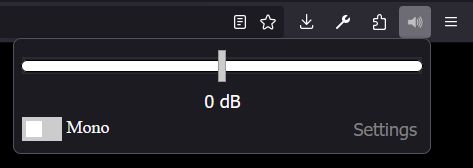
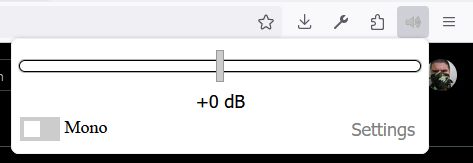
Boost, or lower your volume up to or down 32 DB.
59.469 người dùng59.469 người dùng
Siêu dữ liệu mở rộng
Ảnh chụp màn hình
Về tiện ích mở rộng này
Volume Control adds a simple per-site volume control to your browser. It can lower volume, boost HTML5 audio and video above the normal browser limit, and optionally play stereo audio as mono. The extension is useful for quiet videos, uneven site volume, embedded players, and pages that do not provide enough audio control on their own.
Settings can be remembered per site, and you can exclude sites where you do not want the extension to run. Volume Control supports HTML5 video and audio only; it does not support Flash.
Privacy Policy
Volume Control does not collect, transmit, sell, share, or store any personal information outside your browser.
The extension does not use analytics, telemetry, tracking pixels, remote logging, accounts, advertising IDs, or any external server for data collection. Your volume settings, mono setting, excluded sites, remembered sites, whitelist or blacklist mode, and debug preference are stored only in your browser's local extension storage.
The extension reads page audio/video elements locally in your browser only so it can apply the volume and mono settings you choose. This processing happens on your device. No browsing history, page content, audio content, media titles, URLs, or settings are sent to the developer or to any third party.
Permissions
Volume Control asks for the browser permissions needed to control audio reliably across modern websites:
storage: Saves your volume settings, mono setting, remembered site settings, exclusion list, whitelist/blacklist mode, and debug preference locally in your browser.
activeTab: Lets the popup identify and update the current tab after you interact with the extension, without requesting broader tab access.
<all_urls> host permission: Allows the content scripts to run on websites where audio or video may exist. This is needed because the extension has to access HTML5 media elements and WebAudio connections inside the page to change their volume.
all_frames content script access: Lets the extension work with audio/video inside embedded frames, such as video players, social embeds, and media hosted from another domain.
file:///* content script match: Allows the extension to work on local media files when the browser permits extension access to file URLs.
The broad site access permission is for local audio control only. It is not used to collect data, monitor browsing, inject ads, or communicate page information to any server.
Volume Control, allows you to lower or boost a tabs volume. It works for HTML5 video. I wanted a volume booster that was FOSS. The other volume booster [600% volume boost] on the FireFox addons page, had references to alibaba's site the source code. There was also bloat requesting donations etc.
This extension is very clean, light and FOSS.
Source: https://github.com/Chaython/volumecontrol
Need help? Contact me on the github repository
Settings can be remembered per site, and you can exclude sites where you do not want the extension to run. Volume Control supports HTML5 video and audio only; it does not support Flash.
Privacy Policy
Volume Control does not collect, transmit, sell, share, or store any personal information outside your browser.
The extension does not use analytics, telemetry, tracking pixels, remote logging, accounts, advertising IDs, or any external server for data collection. Your volume settings, mono setting, excluded sites, remembered sites, whitelist or blacklist mode, and debug preference are stored only in your browser's local extension storage.
The extension reads page audio/video elements locally in your browser only so it can apply the volume and mono settings you choose. This processing happens on your device. No browsing history, page content, audio content, media titles, URLs, or settings are sent to the developer or to any third party.
Permissions
Volume Control asks for the browser permissions needed to control audio reliably across modern websites:
storage: Saves your volume settings, mono setting, remembered site settings, exclusion list, whitelist/blacklist mode, and debug preference locally in your browser.
activeTab: Lets the popup identify and update the current tab after you interact with the extension, without requesting broader tab access.
<all_urls> host permission: Allows the content scripts to run on websites where audio or video may exist. This is needed because the extension has to access HTML5 media elements and WebAudio connections inside the page to change their volume.
all_frames content script access: Lets the extension work with audio/video inside embedded frames, such as video players, social embeds, and media hosted from another domain.
file:///* content script match: Allows the extension to work on local media files when the browser permits extension access to file URLs.
The broad site access permission is for local audio control only. It is not used to collect data, monitor browsing, inject ads, or communicate page information to any server.
Volume Control, allows you to lower or boost a tabs volume. It works for HTML5 video. I wanted a volume booster that was FOSS. The other volume booster [600% volume boost] on the FireFox addons page, had references to alibaba's site the source code. There was also bloat requesting donations etc.
This extension is very clean, light and FOSS.
Source: https://github.com/Chaython/volumecontrol
Need help? Contact me on the github repository
Được xếp hạng 3,8 (bởi 1 người dùng)
Quyền hạn và dữ liệu
Quyền hạn bắt buộc:
- Truy cập dữ liệu của bạn trên mọi trang web
Quyền hạn tùy chọn:
- Truy cập dữ liệu của bạn trên mọi trang web
Thu thập dữ liệu:
- Nhà phát triển cho biết tiện ích mở rộng này không yêu cầu thu thập dữ liệu.
Thêm thông tin
- Liên kết tiện ích
- Phiên bản
- 6.7
- Kích cỡ
- 41,08 KB
- Cập nhật gần nhất
- một tháng trước (5 Thg 07 2026)
- Thể loại có liên quan
- Giấy phép
- Mọi Quyền Được Bảo Lưu
- Lịch sử các phiên bản
- Thêm vào bộ sưu tập
Nhà phát triển của tiện ích mở rộng này yêu cầu bạn giúp hỗ trợ sự phát triển liên tục của nó bằng cách đóng góp nhỏ.