
ZIP Writer bởi Bắn Cá C54
Create zip files via an easy-to-use UI right in your browser!
1 người dùng1 người dùng
Siêu dữ liệu mở rộng
Ảnh chụp màn hình

Về tiện ích mở rộng này
Create zip files via an easy-to-use UI right in your browser!
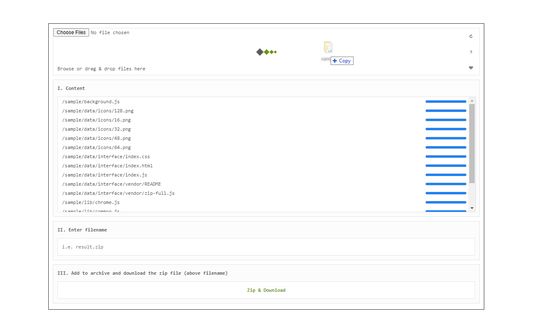
ZIP Writer extension helps you easily convert your file(s) to a single compressed file (.zip).
Simply drag & drop files to a designated area in the app UI (top section). All the uploaded files will be listed in the UI. You can now click on the - Zip & Download - button to download the ZIP file to your system (default download location). There is also a reload button at the top-right corner in the app UI. Clicking on this button will reload the app and reset all active operations. If you want to zip multiple files, please drag & drop them altogether in the app (top section). It is also recommended to reload the UI after each zip operation.
Note 1: this add-on is only designed to make compressed zip files. If you want to extract a zip folder (unzip), please install my other add-on: ZIP Reader (https://chrome.google.com/webstore/detail/zip-reader/hppjaadfhhgadeokjndmbnjnegagcadd)
Note 2: this add-on is using an open-source JavaScript library for the zip operation. You can get more info about this library here: https://github.com/gildas-lormeau/zip.js
If you found a bug to report, or have a feature request, please fill the bug report form on the addon's homepage (https://mybrowseraddon.com/zip-maker.html).
ZIP Writer extension helps you easily convert your file(s) to a single compressed file (.zip).
Simply drag & drop files to a designated area in the app UI (top section). All the uploaded files will be listed in the UI. You can now click on the - Zip & Download - button to download the ZIP file to your system (default download location). There is also a reload button at the top-right corner in the app UI. Clicking on this button will reload the app and reset all active operations. If you want to zip multiple files, please drag & drop them altogether in the app (top section). It is also recommended to reload the UI after each zip operation.
Note 1: this add-on is only designed to make compressed zip files. If you want to extract a zip folder (unzip), please install my other add-on: ZIP Reader (https://chrome.google.com/webstore/detail/zip-reader/hppjaadfhhgadeokjndmbnjnegagcadd)
Note 2: this add-on is using an open-source JavaScript library for the zip operation. You can get more info about this library here: https://github.com/gildas-lormeau/zip.js
If you found a bug to report, or have a feature request, please fill the bug report form on the addon's homepage (https://mybrowseraddon.com/zip-maker.html).
Được xếp hạng 0 (bởi 1 người dùng)
Quyền hạn và dữ liệu
Thêm thông tin
- Liên kết tiện ích
- Phiên bản
- 0.1.9
- Kích cỡ
- 118,08 KB
- Cập nhật gần nhất
- 9 tháng trước (29 Thg 05 2025)
- Thể loại có liên quan
- Giấy phép
- Chỉ Giấy phép Công cộng GNU v2.0
- Lịch sử các phiên bản
- Thêm vào bộ sưu tập