
WhaleVault 作者: alexpmorris
Secure Graphene Cross-Chain Key Store Extension
25 个用户25 个用户
扩展元数据
屏幕截图


关于此扩展
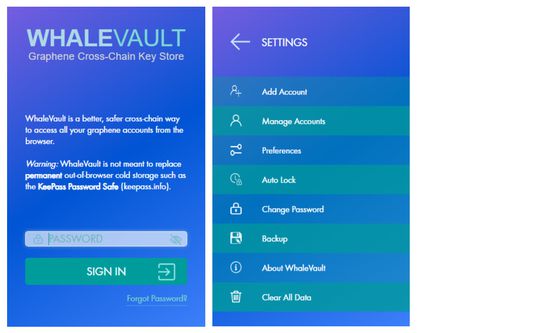
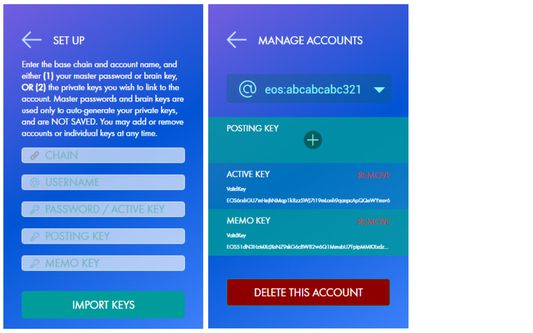
WhaleVault is a better, safer cross-chain way to access all your graphene accounts from Chrome-based browsers (including Brave, Opera, Yandex Mobile Android, and Kiwi Mobile Android), Firefox, and Firefox Android. Graphene blockchains supported out-of-the-box include Whaleshares wlsWorld, BitShares, EOS/Vaulta, Steem, Hive, Blurt, Telos, Worbli, Golos/CyberWay, Peerplays, and Scorum.
The extension injects the WhaleVault API into each website's javascript context, so that any website that you authorize can safely and securely request a signature or encrypt/decrypt a memo without ever having direct access to any of your private keys.
Because it adds functionality to the normal browser context, WhaleVault requires permission to read and write any web page that wishes to access the extension. You can always "view source" of WhaleVault the way you would any Chrome extension, or from the official GitHub repo: https://github.com/alexpmorris/whalevault
WhaleVault also offers a news/alerts feed with domain warnings for alerting users to related crypto site hacks, scams, and other potential phishing attempts.
As an additional precaution, you should only allow "site access" to the WhaleVault extension in Chrome or Firefox for those trusted websites that require it.
For those not using Keychain, WhaleVault will also act as a polyfill for Steem Keychain, Hive Keychain, and Blurt Keychain for seamlessly and securely transacting with any app or wallet that supports them. That includes Hive-Engine / TRIBALDEX support, all from a single extension!
WhaleVault is a multi-chain fork by @alexpmorris of the Steem Keychain browser extension. Steem Keychain (available at https://github.com/MattyIce/steem-keychain) was originally created by @yabapmatt, developed by @stoodkev, and funded by @aggroed. Many thanks to them for creating a great template upon which to build WhaleVault!
A more detailed overview of WhaleVault may be found at: https://wlsworld.vip/@alexpmorris/whalevault-secure-graphene-cross-chain-key-store-extension
For the official WhaleVault Chrome Extension, visit:
https://chrome.google.com/webstore/detail/hcoigoaekhfajcoingnngmfjdidhmdon
The extension injects the WhaleVault API into each website's javascript context, so that any website that you authorize can safely and securely request a signature or encrypt/decrypt a memo without ever having direct access to any of your private keys.
Because it adds functionality to the normal browser context, WhaleVault requires permission to read and write any web page that wishes to access the extension. You can always "view source" of WhaleVault the way you would any Chrome extension, or from the official GitHub repo: https://github.com/alexpmorris/whalevault
WhaleVault also offers a news/alerts feed with domain warnings for alerting users to related crypto site hacks, scams, and other potential phishing attempts.
As an additional precaution, you should only allow "site access" to the WhaleVault extension in Chrome or Firefox for those trusted websites that require it.
For those not using Keychain, WhaleVault will also act as a polyfill for Steem Keychain, Hive Keychain, and Blurt Keychain for seamlessly and securely transacting with any app or wallet that supports them. That includes Hive-Engine / TRIBALDEX support, all from a single extension!
WhaleVault is a multi-chain fork by @alexpmorris of the Steem Keychain browser extension. Steem Keychain (available at https://github.com/MattyIce/steem-keychain) was originally created by @yabapmatt, developed by @stoodkev, and funded by @aggroed. Many thanks to them for creating a great template upon which to build WhaleVault!
A more detailed overview of WhaleVault may be found at: https://wlsworld.vip/@alexpmorris/whalevault-secure-graphene-cross-chain-key-store-extension
For the official WhaleVault Chrome Extension, visit:
https://chrome.google.com/webstore/detail/hcoigoaekhfajcoingnngmfjdidhmdon
评分 4.7(1 位用户)
权限与数据
更多信息
- 附加组件链接
- 版本
- 0.1.51
- 大小
- 771.42 KB
- 上次更新
- 1 个月前 (2026年4月15日)
- 许可证
- MIT 许可证
- 隐私政策
- 阅读此附加组件的隐私政策
- 版本历史
- 添加到收藏集