
CF Fetcher 作者: Mohabbat
Fetch your Codeforces accepted submissions and generate a README.md file for your GitHub repository
3 位使用者3 位使用者
擴充套件後設資料
畫面擷圖


關於此擴充套件
Fetch your Codeforces accepted submissions and generate a README.md file for your GitHub repository
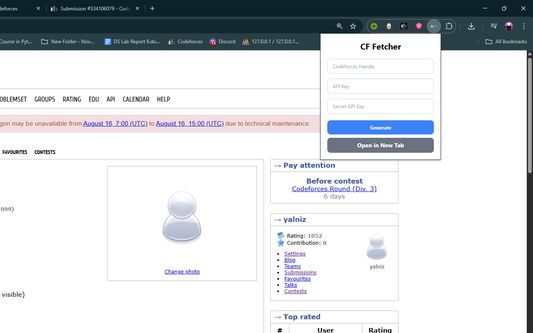
Codeforces Submission Fetcher is a simple Chrome extension that lets you fetch your latest Codeforces accepted submissions, generate a README.md in a beautiful tabular format, and upload it to your GitHub repository.
Features
- Fetch your latest Codeforces accepted solutions.
- Automatically format results into a clean and organized table.
- Generate a ready-to-use README.md file.
- Option to upload directly to your GitHub repository.
- Works entirely in your browser — no external server needed.
Usage
- Get API Keys: Go to Codeforces Settings → API and generate keys
- Open Extension: Click the CF Fetcher icon in your browser
- Enter Details: Add your handle, API key, and secret key
- Generate: Click "Generate" to create your ZIP file
- Download: The file will download automatically
- Unzip: Extract the contents of the ZIP file
- Upload: Upload the extracted files to your GitHub repository
How It Works
1. Enter your Codeforces handle, API key, and secret key.
2. Click "Generate".
3. Download your auto-generated README.md and upload it to GitHub.
4. Share your competitive programming achievements with the world!
Privacy
Your API credentials are only used locally in your browser. Nothing is stored or sent to third-party servers.
Created with with ❤️ for competitive programmers.
Codeforces Submission Fetcher is a simple Chrome extension that lets you fetch your latest Codeforces accepted submissions, generate a README.md in a beautiful tabular format, and upload it to your GitHub repository.
Features
- Fetch your latest Codeforces accepted solutions.
- Automatically format results into a clean and organized table.
- Generate a ready-to-use README.md file.
- Option to upload directly to your GitHub repository.
- Works entirely in your browser — no external server needed.
Usage
- Get API Keys: Go to Codeforces Settings → API and generate keys
- Open Extension: Click the CF Fetcher icon in your browser
- Enter Details: Add your handle, API key, and secret key
- Generate: Click "Generate" to create your ZIP file
- Download: The file will download automatically
- Unzip: Extract the contents of the ZIP file
- Upload: Upload the extracted files to your GitHub repository
How It Works
1. Enter your Codeforces handle, API key, and secret key.
2. Click "Generate".
3. Download your auto-generated README.md and upload it to GitHub.
4. Share your competitive programming achievements with the world!
Privacy
Your API credentials are only used locally in your browser. Nothing is stored or sent to third-party servers.
Created with with ❤️ for competitive programmers.
由 1 位評論者給出 0 分
權限與資料
更多資訊
- 版本
- 1.1.0
- 大小
- 163.03 KB
- 最近更新
- 4 個月前 (2025年8月23日)
- 授權條款
- MIT License
- 隱私權保護政策
- 閱讀此附加元件的隱私權保護政策
- 版本紀錄
- 新增至收藏集