Fancy Links 作者: Evan Wondrasek
Easily transform plain URLs into friendly links with included page titles. Perfect for sharing in chat apps, Reddit, GitHub, documentation, and anywhere formatted links look better than bare URLs.
1 位使用者1 位使用者
擴充套件後設資料
畫面擷圖
關於此擴充套件
Fancy Links transforms plain URLs into friendly links with included page titles. Perfect for sharing in chat apps, documentation, and anywhere formatted links look better than bare URLs.
MULTIPLE LINK FORMATS:
- Markdown:
- HTML:
- Plain Text:
- URL with Title Parameter:
ADDITIONAL FEATURES:
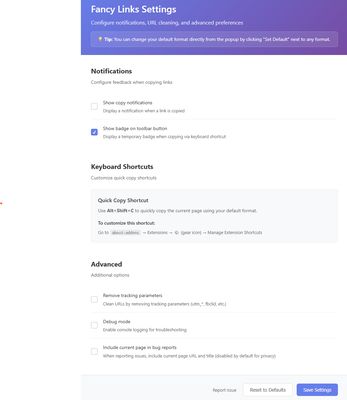
- One-click copy from toolbar popup with live format previews
- Keyboard shortcut (Windows:
- Clean URLs option to remove tracking parameters (UTM, Facebook, etc.)
- Customizable settings for default format and notifications
- Works on Windows, macOS, and Linux
HOW TO USE:
1. Click the toolbar icon to see all format options with live previews
2. Use the keyboard shortcut for quick copy with your default format
3. Configure preferences in the settings page (click the toolbar icon → select the settings/gear icon)
The extension requires minimal permissions and respects your privacy. All processing happens locally in your browser. And it's open source!
MULTIPLE LINK FORMATS:
- Markdown:
[Title](URL) - Used in Reddit, GitHub, Discord, Obisidan, Notion, and many more- HTML:
<a href="URL">Title</a>- Plain Text:
Title - URL- URL with Title Parameter:
URL?_title=TitleADDITIONAL FEATURES:
- One-click copy from toolbar popup with live format previews
- Keyboard shortcut (Windows:
Alt+Shift+C / macOS: Opt+Shift+C) for instant copying with your default format- Clean URLs option to remove tracking parameters (UTM, Facebook, etc.)
- Customizable settings for default format and notifications
- Works on Windows, macOS, and Linux
HOW TO USE:
1. Click the toolbar icon to see all format options with live previews
2. Use the keyboard shortcut for quick copy with your default format
3. Configure preferences in the settings page (click the toolbar icon → select the settings/gear icon)
The extension requires minimal permissions and respects your privacy. All processing happens locally in your browser. And it's open source!
由 1 位評論者給出 0 分
權限與資料
更多資訊