Page Saver WE screenshot capture tool 作者: Kathleen Brade、 Mark Smith
Quickly and easily capture an image of a web page. Options allow you to control output format (PNG or JPEG), file name and more.
6,670 位使用者6,670 位使用者
擴充套件後設資料
畫面擷圖
關於此擴充套件
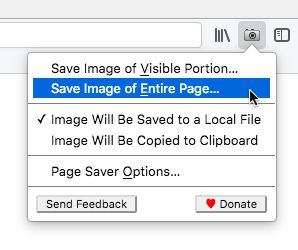
Page Saver WE lets you capture images of web pages and save them to a file in PNG or JPEG format, or to the system clipboard. Using Page Saver, you can capture a web page screenshot of an entire page or just the visible portion. To allow you to control the image capture process, a variety of options are provided including a file name pattern and support for an optional header and footer.
To begin using Page Saver WE, click the camera icon on your Firefox toolbar or press Alt+Shift+I (Linux and Windows) or ⌘+Shift+I (macOS).
Please Note: Due to restrictions Firefox imposes on extensions, Page Saver WE cannot capture images of internal Firefox pages such as about:addons or Mozilla hosted pages such as https://addons.mozilla.org/.
Questions? Contact the developers by sending email to support@pearlcrescent.com
To begin using Page Saver WE, click the camera icon on your Firefox toolbar or press Alt+Shift+I (Linux and Windows) or ⌘+Shift+I (macOS).
Please Note: Due to restrictions Firefox imposes on extensions, Page Saver WE cannot capture images of internal Firefox pages such as about:addons or Mozilla hosted pages such as https://addons.mozilla.org/.
Questions? Contact the developers by sending email to support@pearlcrescent.com
由 1 位評論者給出 4.4 分
權限與資料
更多資訊
- 版本
- 0.8.2
- 大小
- 103.28 KB
- 最近更新
- 4 年前 (2022年7月27日)
- 版本紀錄
- 新增至收藏集