
Security Tweaks 作者: Benthum
Improve your security and browse safer with seven tweaks.
23 位使用者23 位使用者
擴充套件後設資料
畫面擷圖


關於此擴充套件
Security Tweaks is a Firefox addon that help you improve your security while browsing by using seven different techniques.
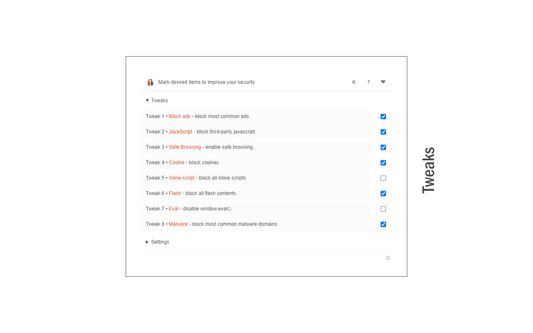
Simply open toolbar popup UI and mark a desired tweak. Please note that, only few tweaks are selected by default. There are few settings (related to JavaScript, inline-script and cookie) available in toolbar popup to adjust.
Currently there are 8 tweaks available for this addon:
1. Block most common ads.
2. Block third-party JavaScript.
3. Enable safe-browsing.
4. Block cookies.
5. Block inline-script.
6. Block Flash contents.
7. Disable window.eval().
8. Block most common malware domains.
Important note: currently in Firefox browser, Tweaks #3 and #4 are disabled by default. This is because the underlying API is not currently available. In future, when these APIs become available, these tweaks will be enabled automatically.
In order to report bugs, please fill the bug report form in the addon's homepage.
Simply open toolbar popup UI and mark a desired tweak. Please note that, only few tweaks are selected by default. There are few settings (related to JavaScript, inline-script and cookie) available in toolbar popup to adjust.
Currently there are 8 tweaks available for this addon:
1. Block most common ads.
2. Block third-party JavaScript.
3. Enable safe-browsing.
4. Block cookies.
5. Block inline-script.
6. Block Flash contents.
7. Disable window.eval().
8. Block most common malware domains.
Important note: currently in Firefox browser, Tweaks #3 and #4 are disabled by default. This is because the underlying API is not currently available. In future, when these APIs become available, these tweaks will be enabled automatically.
In order to report bugs, please fill the bug report form in the addon's homepage.
由 1 位評論者給出 5 分
權限與資料
更多資訊