
Souffleur 作者: Tingler
Efficiently manage and access prompts for Large Language Models like ChatGPT, Claude, and Gemini. Streamline your AI interactions with quick prompt retrieval and customization.
10 位使用者10 位使用者
擴充套件後設資料
畫面擷圖
關於此擴充套件
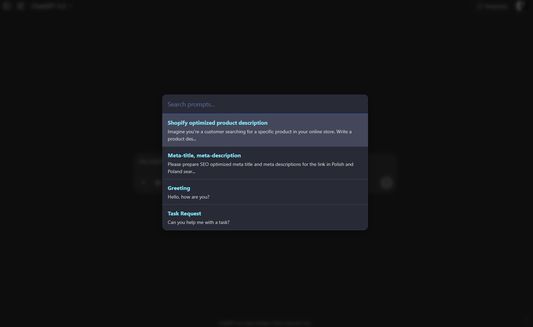
A Firefox extension for managing and quickly accessing prompts for Large Language Models with a MacOS Spotlight-like interface.
Features
How to Use
Keyboard Shortcuts
(You can customize these shortcuts by navigating to
Features
- MacOS Spotlight-like Interface: Press
Ctrl+Shift+Uto open a spotlight-style overlay in the middle of the viewport. - Chatbot Agnostic: Works on any website, not just specific LLM platforms.
- Clipboard Integration: Selected prompts are copied to clipboard instead of being inserted into input fields.
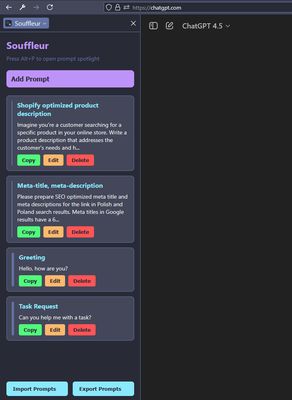
- Prompt Management: Add, edit, delete, and reorder prompts through the Firefox Sidebar
- Import/Export: Import and export your prompts as JSON files
- Improved UX (v4.7): Spotlight overlay closes instantly upon prompt selection, with a brief "Prompt Copied!" feedback message shown. Focus returns to the previously active element.
- Manifest V3: Updated core using Manifest V3 with Firefox-compatible APIs.
How to Use
- Add Prompts: Open the Sidebar (click the extension icon or press Ctrl+Shift+L) and add your prompts.
- Access Prompts: Press Alt+P to open the spotlight overlay, search for a prompt, and press Enter to copy it to clipboard.
- Manage Prompts: Use the Sidebar to edit, delete, or reorder your prompts.
- Import/Export: Use the buttons at the bottom of the Sidebar to import or export your prompts as JSON.
Keyboard Shortcuts
Ctrl+Alt+P: Toggle the SidebarAlt+P: Open the spotlight overlay
(You can customize these shortcuts by navigating to
about:addons, clicking the gear icon ⚙️, and selecting "Manage Extension Shortcuts".)由 1 位評論者給出 0 分
權限與資料
更多資訊