Quick translate for Youtube captions 作者: am-tb.tk
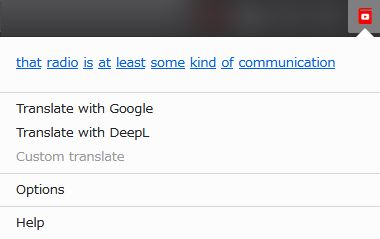
Translate Youtube captions and look up words easily! This add-on adds a button on Youtube screen so you can translate captions with 1 click. You can also look up words used in captions from add-on menu.
1,164 位使用者1,164 位使用者
擴充套件後設資料
畫面擷圖
關於此擴充套件
Translate Youtube captions and look up words easily!
This add-on adds a button on Youtube screen so you can translate captions/subtitles with 1 click. You can also look up words used in captions from add-on menu.
Choose translate service from Google or DeepL, or customize as you like. Online dictionary setting is also customizable.
You can select captions/subtitles text if you turn off "Look up words"option. Copy and paste freely!
[NOTE: You can also install as Chrome Extension]
*Please use it at your own risk.
1. Open Chrome browser.
2. Download Firefox add-on file from HERE.
3. Rename file extension from "xpi" to "zip", then unzip it.
4. Open Chrome MENU > MORE TOOLS > EXTENSIONS
5. Turn on DEVELOPER MODE.
6. Select LOAD UNPACKED.
7. Select the unzipped folder above.
8. Click EXTENSIONS icon on Chrome toolbar.
9. Pin "Quick translate for Youtube captions".
This add-on adds a button on Youtube screen so you can translate captions/subtitles with 1 click. You can also look up words used in captions from add-on menu.
Choose translate service from Google or DeepL, or customize as you like. Online dictionary setting is also customizable.
You can select captions/subtitles text if you turn off "Look up words"option. Copy and paste freely!
[NOTE: You can also install as Chrome Extension]
*Please use it at your own risk.
1. Open Chrome browser.
2. Download Firefox add-on file from HERE.
3. Rename file extension from "xpi" to "zip", then unzip it.
4. Open Chrome MENU > MORE TOOLS > EXTENSIONS
5. Turn on DEVELOPER MODE.
6. Select LOAD UNPACKED.
7. Select the unzipped folder above.
8. Click EXTENSIONS icon on Chrome toolbar.
9. Pin "Quick translate for Youtube captions".
由 1 位評論者給出 3.7 分
權限與資料
更多資訊