
WiDa 作者: Marek Boháč
The dictionary definition for a selected, mouse pointed or manually input word
1 位使用者1 位使用者
擴充套件後設資料
畫面擷圖
關於此擴充套件
Usage:
1. Input a search term. There are two ways to do so:
- select (highlight) a word (or a part of it) on a web page, or just point at a word. Then press both Ctrl keys.
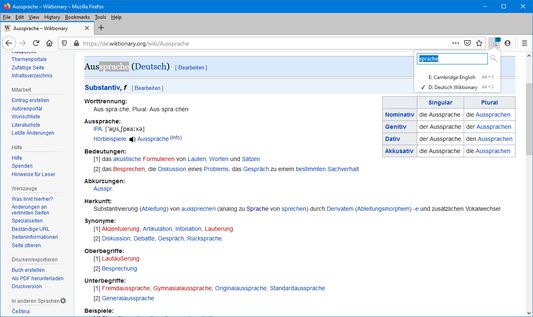
- press this extension's toolbar button or use the Ctrl + Space combo to pop up the extension toolbar menu. Then simply put the search term to the input box and press the search button (or the Enter key).
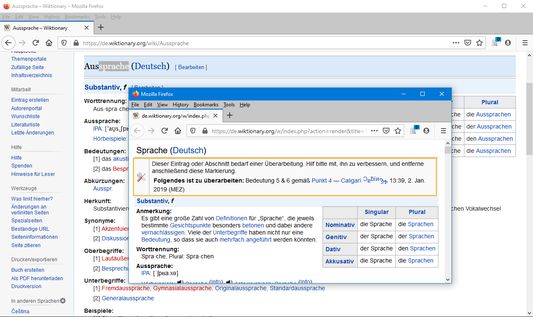
2. The dictionary definition for the word opens in a new window. All subsequent searches will open in the same window.
Press Alt + 0-9 (the number of a desired dictionary) to switch between dictionaries. Or, click the add-on's icon and select the dictionary from the menu. Use the add-on's options page to edit the dictionaries.
You can use the left Ctrl + right Shift or left Shift + right Ctrl combo to change the case of the first letter of the selected word - e.g. when the selected text is "land", the searched term will be changed to "Land" (with capital "L"), and vice versa.
The dictionary window will remember its size and position and restore them upon reopening. This can be turned off on the options page.
1. Input a search term. There are two ways to do so:
- select (highlight) a word (or a part of it) on a web page, or just point at a word. Then press both Ctrl keys.
- press this extension's toolbar button or use the Ctrl + Space combo to pop up the extension toolbar menu. Then simply put the search term to the input box and press the search button (or the Enter key).
2. The dictionary definition for the word opens in a new window. All subsequent searches will open in the same window.
Press Alt + 0-9 (the number of a desired dictionary) to switch between dictionaries. Or, click the add-on's icon and select the dictionary from the menu. Use the add-on's options page to edit the dictionaries.
You can use the left Ctrl + right Shift or left Shift + right Ctrl combo to change the case of the first letter of the selected word - e.g. when the selected text is "land", the searched term will be changed to "Land" (with capital "L"), and vice versa.
The dictionary window will remember its size and position and restore them upon reopening. This can be turned off on the options page.
由 1 位評論者給出 0 分
權限與資料
更多資訊