
xBrowserSync 作者: xBrowserSync
Browser syncing as it should be: secure, anonymous and free! Sync bookmarks across your browsers and devices, no sign up required.
3,063 位使用者3,063 位使用者
擴充套件後設資料
畫面擷圖



關於此擴充套件
xBrowserSync is a completely free and open source tool for syncing your bookmarks and browser data between your desktop browsers. xBrowserSync respects your privacy and gives you complete anonymity — no sign up is required and no personal data is ever collected. It is also completely secure; your data is encrypted client-side with military grade encryption, Even if someone intercepted your data, only you can decrypt it.
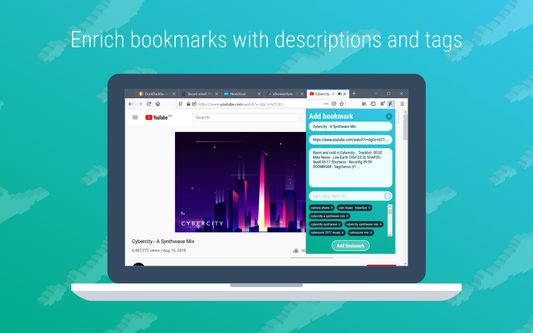
xBrowserSync enriches your bookmarks with the addition of descriptions and tags. An intuitive search interface lets you find bookmarks quickly and easily, or simply browse your bookmarks hierarchy by folders. And don’t ever worry about losing your data thanks to the included back up and restore functionality.
The web extension fully supports your native desktop browser bookmarking features; xBrowserSync will preserve your existing bookmarks hierarchy and any changes you make using the native bookmarking functionality are synced by xBrowserSync automatically. xBrowserSync will even add metadata to new bookmarks automatically!
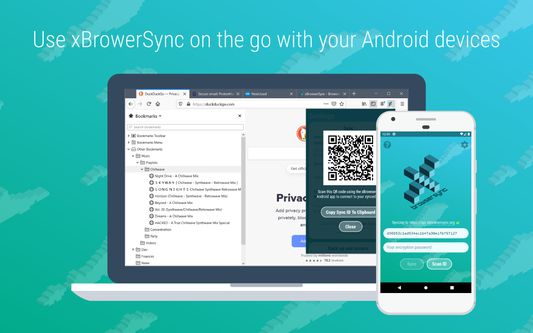
With the xBrowserSync mobile app you can use xBrowserSync on the go with your Android device. Once you have created a new sync on your desktop browser using the web extension, simply scan your sync ID code into the app and enter your password to connect to your synced data. Add new bookmarks easily by sharing from your favourite apps (browsers, YouTube, Spotify and any other app that shares URLs), xBrowserSync will even populate the bookmark properties for you.
For ultimate privacy, configure your very own xBrowserSync cloud service on your Linux or Windows server to sync to. The code for the xBrowserSync cloud service is open source and is easy to set up for any relatively tech savvy individual.
Welcome to browser syncing as it should be: secure, anonymous and free!
Key features:
★ Sync bookmarks between desktop browsers (syncing of additional browser data will be added in future versions), and access bookmarks on the move using the xBrowserSync Android app.
★ Absolutely free, there are no charges for using the service. Ever.
★ Totally anonymous, no sign up or submission of personal data required, just install and sync.
★ Encrypts your browser data client-side using military grade encryption that only you can decrypt.
★ Browse, find, modify and share bookmarks quickly and easily.
★ Enrich your bookmarks with descriptions and tags.
★ Works with native desktop browser bookmarking features.
★ Add bookmarks with the mobile app by sharing from your favourite apps.
★ Share bookmarks with friends with the mobile app.
★ Back up and restore your synced data for total peace of mind.
★ Run your very own xBrowserSync cloud service for syncing in complete privacy.
For more information visit www.xbrowsersync.org.
Important: There are known issues when using the native Firefox bookmark features with xBrowserSync, please review them carefully before use.
xBrowserSync enriches your bookmarks with the addition of descriptions and tags. An intuitive search interface lets you find bookmarks quickly and easily, or simply browse your bookmarks hierarchy by folders. And don’t ever worry about losing your data thanks to the included back up and restore functionality.
The web extension fully supports your native desktop browser bookmarking features; xBrowserSync will preserve your existing bookmarks hierarchy and any changes you make using the native bookmarking functionality are synced by xBrowserSync automatically. xBrowserSync will even add metadata to new bookmarks automatically!
With the xBrowserSync mobile app you can use xBrowserSync on the go with your Android device. Once you have created a new sync on your desktop browser using the web extension, simply scan your sync ID code into the app and enter your password to connect to your synced data. Add new bookmarks easily by sharing from your favourite apps (browsers, YouTube, Spotify and any other app that shares URLs), xBrowserSync will even populate the bookmark properties for you.
For ultimate privacy, configure your very own xBrowserSync cloud service on your Linux or Windows server to sync to. The code for the xBrowserSync cloud service is open source and is easy to set up for any relatively tech savvy individual.
Welcome to browser syncing as it should be: secure, anonymous and free!
Key features:
★ Sync bookmarks between desktop browsers (syncing of additional browser data will be added in future versions), and access bookmarks on the move using the xBrowserSync Android app.
★ Absolutely free, there are no charges for using the service. Ever.
★ Totally anonymous, no sign up or submission of personal data required, just install and sync.
★ Encrypts your browser data client-side using military grade encryption that only you can decrypt.
★ Browse, find, modify and share bookmarks quickly and easily.
★ Enrich your bookmarks with descriptions and tags.
★ Works with native desktop browser bookmarking features.
★ Add bookmarks with the mobile app by sharing from your favourite apps.
★ Share bookmarks with friends with the mobile app.
★ Back up and restore your synced data for total peace of mind.
★ Run your very own xBrowserSync cloud service for syncing in complete privacy.
For more information visit www.xbrowsersync.org.
Important: There are known issues when using the native Firefox bookmark features with xBrowserSync, please review them carefully before use.
由 1 位評論者給出 4 分
權限與資料
更多資訊
- 版本
- 1.5.2
- 大小
- 1.88 MB
- 最近更新
- 6 年前 (2020年4月9日)
- 隱私權保護政策
- 閱讀此附加元件的隱私權保護政策
- 版本紀錄
- 新增至收藏集