
APK Downloader wót Apkgk.com
APK Downloader Direct download apps of the Google apps store without using Google Play.
1.894 wužywarjow1.894 wužywarjow
Metadaty rozšyrjenja
Fota wobrazowki
Wó toś tom rozšyrjenju
APK Downloader Direct download apps of the Google apps store without using Google Play.
APK Downloader is a Google Firefox extension that allows you to download Android APK files from Google Play Store (Android Market) to your PC
If you can not install app from google play (ex: country restrict app, device restrict app...) you can using this tool to find original APK file and download it for manual install.
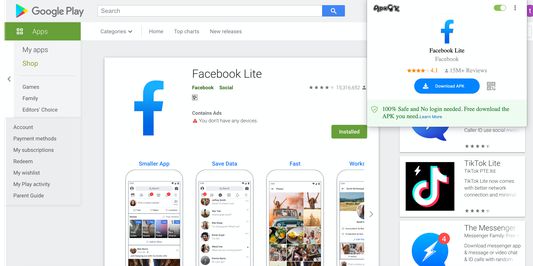
This extension will help you download APK file Directly from Google Play Store through ApkGK.com APK Downloader Service. It will add a "Download APK" button on the Google Play Website.
Features :
This is the official page of APK Downloader. Do not download the extension from other sources.
Install APK on Your Android Phone
First you need to install the APK file on your android phone. In order to do that, simply follow the steps below:
Where to put the OBB or Data file?
That’s it. You have successfully complete the process. You can now enjoy the full features of APK on your android phone.
APK Downloader Online : APK Downloader Online
Contact :
If users have any questions or suggestions regarding our privacy policy, please contact us at: https://apkgk.com/contact-us
APK Downloader is a Google Firefox extension that allows you to download Android APK files from Google Play Store (Android Market) to your PC
If you can not install app from google play (ex: country restrict app, device restrict app...) you can using this tool to find original APK file and download it for manual install.
This extension will help you download APK file Directly from Google Play Store through ApkGK.com APK Downloader Service. It will add a "Download APK" button on the Google Play Website.
Features :
- Easy to setup
- Download .OBB files ( APK Expansion files ) from games.
- Support both Firefox
This is the official page of APK Downloader. Do not download the extension from other sources.
Install APK on Your Android Phone
First you need to install the APK file on your android phone. In order to do that, simply follow the steps below:
- Place the APK file in your phone’s SDcard or Internal memory (preferably external SDcard).
- Browse your phone memory/external memory and tap on the APK file.
- Click ‘install’
- Wait for the APK to install.
- Do not run the application yet.
- After successful installation, you need to place the Data / OBB file in the right place.
Where to put the OBB or Data file?
- First of all unzip/extract the downloaded OBB or Data file in your PC or laptop.
- Copy the ‘Data’ folder and place it into the given path:
External SD Card > Android > Data > **paste the folder here**
In case of OBB files, copy the OBB folder and place it in the given path here:
External SD Card > Android > OBB > **paste the folder here**
- If you cannot find the OBB or Data folder, you can create a new folder manually.
- Make sure that the files are successfully copied in your SDcard.
- Disconnect your phone from PC.
- Run the APK file now.
That’s it. You have successfully complete the process. You can now enjoy the full features of APK on your android phone.
APK Downloader Online : APK Downloader Online
Contact :
If users have any questions or suggestions regarding our privacy policy, please contact us at: https://apkgk.com/contact-us
Z 3,7 wót 61 pógódnośujucych pógódnośony
Pšawa a daty
Trjebne pšawa:
- Pśistup k rejtarikam wobglědowaka měś
- Mějśo pśistup k swójim datam za play.google.com
Dalšne informacije
- Dodankowe wótzkaze
- Wersija
- 2.0.6
- Wjelikosć
- 109,42 KB
- Slědny raz zaktualizěrowany
- 5 წლის წინ (31 აგვ 2020)
- Pśiswójźbne kategorije
- Licenca
- Wšykne pšawa wuměnjone
- Wersijowa historija
- Zběrce pśidaś