Dodanki za Firefox Browser
  • Rozšyrjenja
  • Drastwy
    • za Firefox
    • Słowniki a rěcne pakśiki
    • Druge sedła wobglědowaka
    • Dodanki za Android
Pśizjawiś
Pśeglěd za Fancy Links

Fancy Links wót Evan Wondrasek

Fancy Links transforms plain URLs into friendly links with included page titles. Perfect for sharing in chat apps, Reddit, GitHub, documentation, and anywhere formatted links look better than bare URLs.

0 (pógódnośenja: 0)0 (pógódnośenja: 0)
1 wužywaŕ1 wužywaŕ
Firefox ześěgnuś a rozšyrjenje wobstaraś
Dataju ześěgnuś

Metadaty rozšyrjenja

Fota wobrazowki
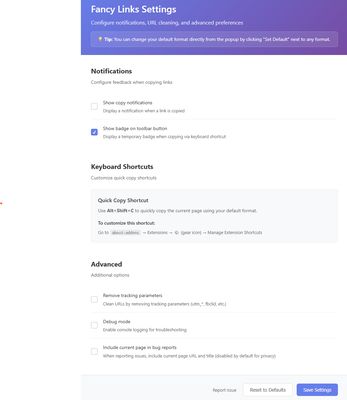
After clicking the Fancy Links toolbar icon, you will see a list of available link formats and can click on one to automatically copy the URL and title of the current page to your clipboard.The Fancy Links settings page, where you can configure notification options, see keyboard shortcuts, remove tracking parameters from URLs (e.g. UTM, Facebook), enable debug mode, and report bugs.
Wó toś tom rozšyrjenju
Fancy Links transforms plain URLs into friendly links with included page titles. Perfect for sharing in chat apps, documentation, and anywhere formatted links look better than bare URLs.

MULTIPLE LINK FORMATS:
- Markdown: [Title](URL) - Used in Reddit, GitHub, Discord, Obisidan, Notion, and many more
- HTML: <a href="URL">Title</a>
- Plain Text: Title - URL
- URL with Title Parameter: URL?_title=Title

ADDITIONAL FEATURES:
- One-click copy from toolbar popup with live format previews
- Keyboard shortcut (Windows: Alt+Shift+C / macOS: Opt+Shift+C) for instant copying with your default format
- Clean URLs option to remove tracking parameters (UTM, Facebook, etc.)
- Customizable settings for default format and notifications
- Works on Windows, macOS, and Linux

HOW TO USE:
1. Click the toolbar icon to see all format options with live previews
2. Use the keyboard shortcut for quick copy with your default format
3. Configure preferences in the settings page (click the toolbar icon → select the settings/gear icon)

The extension requires minimal permissions and respects your privacy. All processing happens locally in your browser. And it's open source!
Z 0 wót 0 pógódnośujucych pógódnośony
Pśizjawśo se, aby toś to rozšyrjenje pógódnośił
Hyšći pógódnośenja njejsu

Gwězdowe pógódnośenje jo se składło

5
0
4
0
3
0
2
0
1
0
Hyšći žedne pógódnośenja
Pšawa a daty

Trjebne pšawa:

  • Daty do mjazywótkłada kopěrowaś
  • Powěźeńki na was pokazaś
Dalšne informacije
Dalšne informacije
Dodankowe wótzkaze
  • Startowy bok
  • Sedło pomocy
  • E-mailowa adresa pomocy
Wersija
1.4.5
Wjelikosć
48,1 KB
Slědny raz zaktualizěrowany
3 månader sidan (21. okt. 2025)
Pśiswójźbne kategorije
  • Webwuwiśe
  • Cytańske znamjenja
  • Socialne a komunikacija
Licenca
Licenca MIT
Wersijowa historija
  • Wšykne wersije pokazaś
Wobznamjenja
  • reddit
  • social media
Zběrce pśidaś
Toś ten dodank k wěsći daś
K startowemu bokoju Mozilla

Dodanki

  • Wó nas
  • Blog dodankow Firefox
  • Źěłowa kupka rozšyrjenjow
  • Wuwijaŕski rožk
  • Wuwijaŕske pšawidła
  • Blog zgromaźeństwa
  • Forum
  • Programowu zmólku k wěsći daś
  • Směrnica za pógódnośenja

Wobglědowaki

  • Desktop
  • Mobile
  • Enterprise

Produkty

  • Browsers
  • VPN
  • Relay
  • Monitor
  • Pocket
  • Bluesky (@firefox.com)
  • Instagram (Firefox)
  • YouTube (firefoxchannel)
  • Priwatnosć
  • Cookieje
  • Pšawniske

Jolic nic hynac zapisane, se wopśimjeśe na toś tom sedle pód Creative Commons Attribution Share-Alike License v3.0 abo póznjejšeju wersiju licencěrujo.