Foxy Tabs wót Francesco De Stefano
A browser extension to help you manage your tabs effectively.
13 wužywarjow13 wužywarjow
Metadaty rozšyrjenja
Fota wobrazowki

Wó toś tom rozšyrjenju
# Foxy Tabs
WebExtension to help you navigate your tabs with ease.
Mini tutorial available on YouTube - https://www.youtube.com/watch?v=9tjQdJv5tCY
## Features
### Tab Management
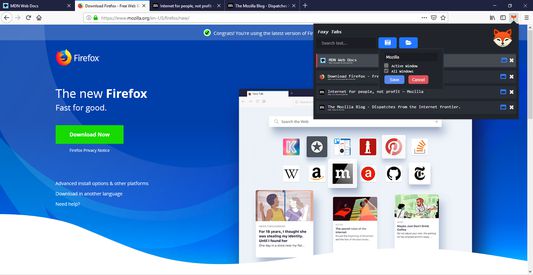
- Search and jump to tabs by title or URL, across all your windows.
- Quickly delete tabs while being able to see their title and URL.
- Keyboard shortcuts for navigation and tab deletion will make you very fast.
### Save Tabs For Later
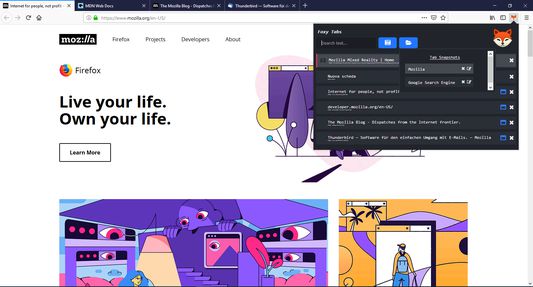
- Tab Snapshots let you save all your open tabs so you can close them and open them later.
- You can take a snapshot of all your windows, or just the currently active one.
- Snapshots are synchronized across all your devices running Firefox and Foxy Tabs.
- Take a snapshot of...
- The internal sites you open at work every day.
- All the web sites you use to procrastinate.
- Snapshots are synchronized to your Firefox profile using [browser.storage.sync]
(https://developer.mozilla.org/en-US/docs/Mozilla/Add-ons/WebExtensions/API/storage/sync)
### Keyboards shortcuts
Press "Enter" to activate a tab. Or click on it.
Use the "Up" and "Down" keys to navigate the tabs list.
Press "Shift+Backspace" to delete the currently highlighted tab in the tabs list.
You can also delete tabs by clicking on the X at the right side of each tab in the list.
Press "Ctrl" while the extension is open to highlight the currently active tab.
WebExtension to help you navigate your tabs with ease.
Mini tutorial available on YouTube - https://www.youtube.com/watch?v=9tjQdJv5tCY
## Features
### Tab Management
- Search and jump to tabs by title or URL, across all your windows.
- Quickly delete tabs while being able to see their title and URL.
- Keyboard shortcuts for navigation and tab deletion will make you very fast.
### Save Tabs For Later
- Tab Snapshots let you save all your open tabs so you can close them and open them later.
- You can take a snapshot of all your windows, or just the currently active one.
- Snapshots are synchronized across all your devices running Firefox and Foxy Tabs.
- Take a snapshot of...
- The internal sites you open at work every day.
- All the web sites you use to procrastinate.
- Snapshots are synchronized to your Firefox profile using [browser.storage.sync]
(https://developer.mozilla.org/en-US/docs/Mozilla/Add-ons/WebExtensions/API/storage/sync)
### Keyboards shortcuts
Press "Enter" to activate a tab. Or click on it.
Use the "Up" and "Down" keys to navigate the tabs list.
Press "Shift+Backspace" to delete the currently highlighted tab in the tabs list.
You can also delete tabs by clicking on the X at the right side of each tab in the list.
Press "Ctrl" while the extension is open to highlight the currently active tab.
Z 5 wót 2 pógódnośujuceju pógódnośony
Pšawa a daty
Dalšne informacije
- Dodankowe wótzkaze
- Wersija
- 1.0.2resigned1
- Wjelikosć
- 146,35 KB
- Slědny raz zaktualizěrowany
- 2 წლის წინ (26 აპრ 2024)
- Pśiswójźbne kategorije
- Licenca
- Licenca MIT
- Wersijowa historija
- Zběrce pśidaś
Wuwijaŕ toś togo rozšyrjenja was pšosy, mały pśinošk pósćiś, aby jogo wuwiśe pódpěrał.