
Grasshopper wót mp
Advanced Tab Manager
51 wužywarjow51 wužywarjow
Metadaty rozšyrjenja
Fota wobrazowki
Wó toś tom rozšyrjenju
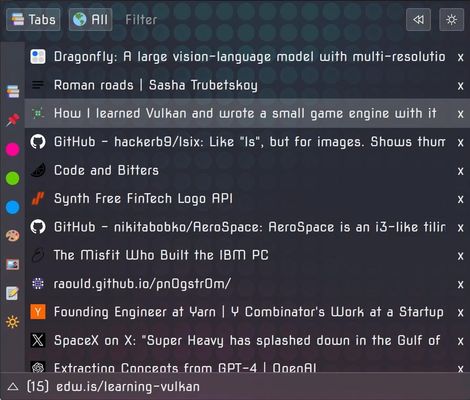
This is meant to complement or even replace the tab bar.
It's a tab manager but also supports History, Bookmarks, and more.
It provides vertical tabs.
It can be used as a popup or on the sidebar.
(Most of the file size is background images for themes)
Why the permissions?
Features:
Shows a list of open tabs.
Tabs update in real time.
Filter tabs by typing.
Pin tabs.
Close tabs.
Show pins or playing tabs.
Filter by title or URL.
Re-open recently closed tabs.
Show tab titles or urls.
Clean (close all tabs except pins).
Go to tabs playing audio.
Go to last visited tabs.
Open new tabs.
Mute/unmute tabs.
Search and filter the history.
Change the color theme.
Customize the interface.
Filter images, videos, audio.
Unload tabs.
Filter by unloaded tabs.
Move tabs to other windows.
Show tab information.
Filter similar tabs.
Filter by duplicates.
Close duplicates.
Move tabs to top or bottom.
Customizable mouse gestures.
Command palette.
Custom filters.
Option to have a single new tab.
Edit color, titles. Add tags.
Regex support in filter.
Add notes to tabs.
Tab separators.
Special header tabs.
Basic Containers support.
Close tabs automatically.
And many more things, I stopped updating this.
Shortcuts:
- Ctrl + Space = Toggle popup
- Ctrl + Shift + Space = Toggle sidebar
Recommended userChrome.css:
1) Go to about:config
2) Enable: toolkit.legacyUserProfileCustomizations.stylesheets
3) Find the profile directory, you can see that path in about:profiles
4) Create chrome/userChrome.css in it
5) Add this to that file and save it:
6) Restart Firefox
Chrome?
There's currently no Chrome version. Chrome has no sidebar API, and even then, porting it requires modifying some of the code. And some things don't work the same. So no Chrome version for now.
It's a tab manager but also supports History, Bookmarks, and more.
It provides vertical tabs.
It can be used as a popup or on the sidebar.
(Most of the file size is background images for themes)
Why the permissions?
- Tabs: To be able to query and update tabs.
For example to make tabs pinned or muted.
To move, open, close tabs. - History: To get the recent history.
There's a History mode.
(History is not modified or deleted).
This is an optional permission. - Bookmarks: To get the bookmarks.
There's a Bookmarks mode.
(Bookmarks can be added but not deleted).
I don't want to touch deletion methods at all.
Since I don't want to be responsible for accidental loss of bookmarks.
So to remove a bookmark you have to use the native browser interface.
This is an optional permission. - Sessions: To get the recently closed tabs.
There's a Closed mode.
(Last 25 closed tabs. These can be forgotten).
To save custom color and titles on tabs. - Clipboard: To paste text from the clipboard when right clicking the filter.
This is used to fill the filter with the content.
This is an optional permission. - "contextualIdentities" and "cookies" for Container features.
Features:
Shows a list of open tabs.
Tabs update in real time.
Filter tabs by typing.
Pin tabs.
Close tabs.
Show pins or playing tabs.
Filter by title or URL.
Re-open recently closed tabs.
Show tab titles or urls.
Clean (close all tabs except pins).
Go to tabs playing audio.
Go to last visited tabs.
Open new tabs.
Mute/unmute tabs.
Search and filter the history.
Change the color theme.
Customize the interface.
Filter images, videos, audio.
Unload tabs.
Filter by unloaded tabs.
Move tabs to other windows.
Show tab information.
Filter similar tabs.
Filter by duplicates.
Close duplicates.
Move tabs to top or bottom.
Customizable mouse gestures.
Command palette.
Custom filters.
Option to have a single new tab.
Edit color, titles. Add tags.
Regex support in filter.
Add notes to tabs.
Tab separators.
Special header tabs.
Basic Containers support.
Close tabs automatically.
And many more things, I stopped updating this.
Shortcuts:
- Ctrl + Space = Toggle popup
- Ctrl + Shift + Space = Toggle sidebar
Recommended userChrome.css:
1) Go to about:config
2) Enable: toolkit.legacyUserProfileCustomizations.stylesheets
3) Find the profile directory, you can see that path in about:profiles
4) Create chrome/userChrome.css in it
5) Add this to that file and save it:
/* Hides the entire tab bar */
#TabsToolbar{
    display: none !important;
}

/* Hides the new Firefox sidebar tools strip and splitter */
#sidebar-main,
#sidebar-launcher-splitter{
    display: none !important;
}

/* Hides the large header on the new revamped sidebar */
#sidebar-panel-header{
    display: none !important;
}

/* Disables the top bar from appearing on mouse-over in F11 Fullscreen */
#navigator-toolbox[inFullscreen="true"]{
    display: none !important;
}

/* Ensures the mouse trigger area itself is disabled in Fullscreen */
#fullscr-toggler{
    display: none !important;
}

/* Shrinks the sidebar splitter and makes it transparent but keeps it functional */
#sidebar-splitter{
    width: 1px !important;
    border: none !important;
    background-color: transparent !important;
}

/* Removes the built-in padding at the bottom of the sidebar container */
#sidebar-box{
    padding: 0 !important;
}

/* Hides the sidebar footer which can reserve empty space even when empty */
#sidebar-footer{
    display: none !important;
}

/* Removes any residual margins from the panel itself */
.sidebar-panel{
    margin: 0 !important;
    padding: 0 !important;
}
6) Restart Firefox
Chrome?
There's currently no Chrome version. Chrome has no sidebar API, and even then, porting it requires modifying some of the code. And some things don't work the same. So no Chrome version for now.
Z 4,9 wót 12 pógódnośujucych pógódnośony
Pšawa a daty
Trjebne pšawa:
- Mějśo pśistup k njedawno zacynjonym rejtarikam
- Pśistup k rejtarikam wobglědowaka měś
Opcionalne pšawa:
- Cytańske znamjenja cytaś a změniś
- Daty z mjazywótkłada zasajźiś
- Mějśo pśistup k pśeglědowańskej historiji
Dalšne informacije
- Dodankowe wótzkaze
- Wersija
- 6661
- Wjelikosć
- 8,41 MB
- Slědny raz zaktualizěrowany
- 9 napja (2026. máj. 29.)
- Pśiswójźbne kategorije
- Wersijowa historija
- Zběrce pśidaś