![Aperçu de Volume Control [Boost volume]](https://addons.mozilla.org/user-media/addon_icons/2750/2750023-64.png?modified=33d02c4f)
Volume Control [Boost volume] par Chaython
Boost, or lower your volume up to or down 32 DB.
66 214 utilisateurs·trices66 214 utilisateurs·trices
Métadonnées de l’extension
Captures d’écran
À propos de cette extension
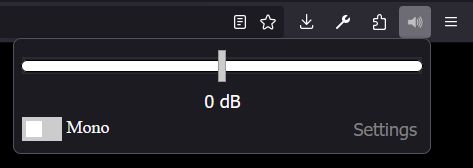
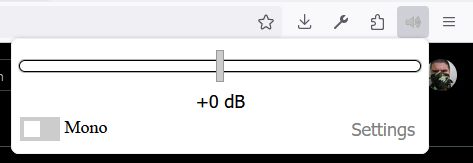
Volume Control adds a simple per-site volume control to your browser. It can lower volume, boost HTML5 audio and video above the normal browser limit, and optionally play stereo audio as mono. The extension is useful for quiet videos, uneven site volume, embedded players, and pages that do not provide enough audio control on their own.
Settings can be remembered per site, and you can exclude sites where you do not want the extension to run. Volume Control supports HTML5 video and audio only; it does not support Flash.
Media that cannot be boosted (DRM-protected or cross-origin streams) is detected automatically: the popup explains the restriction, the slider clamps at 0 dB, and lowering volume still works through the native fallback. See Restricted Media (DRM & Cross-Origin) below.
Some media cannot be routed through WebAudio: DRM-protected streams (EME / Widevine / PlayReady / ClearKey) and cross-origin media loaded without CORS. Routing these through WebAudio either fails or detaches the element's native output and plays silence, so Volume Control detects them and refuses to route — while keeping native volume control working.
What you will see
* The popup shows a "restricted by DRM" note (or a cross-origin restriction note) and the slider clamps at 0 dB — no boost is offered because none is possible on that media.
* Lowering volume still works: the element's native volume is used (attenuation only, exact dB math, and mute).
* Mono mixing is unavailable on such media.
How detection works
* Per-element signals:
* Aggregate page verdict: The MAIN-world hook computes one aggregate page verdict over every element it tracks — attached to the DOM, detached (JS-created players that never touch the DOM), or inside a shadow DOM — and publishes it with immediate change notifications.
* Frame aggregation: Embedded iframes report their verdict to the top frame (1 s heartbeat, 2.5 s TTL) and the most restrictive live report wins; the verdict relaxes automatically when the media goes quiescent or the frame is removed.
* Deterministic computation: All verdicts are computed deterministically by the top frame — no cross-frame response races, which keeps the restriction note stable while you drag the slider.
* Message origin validation: Same-window spoofed messages are ignored (
Browser shortcut settings can be used to remap or disable these defaults (
Pin the extension icon to the toolbar to see native badge feedback while adjusting volume.
Volume Control does not collect, transmit, sell, share, or store any personal information outside your browser.
The extension does not use analytics, telemetry, tracking pixels, remote logging, accounts, advertising IDs, or any external server for data collection. Your volume settings, mono setting, excluded sites, remembered sites, whitelist or blacklist mode, and debug preference are stored only in your browser's local extension storage.
The extension reads page audio/video elements locally in your browser only so it can apply the volume and mono settings you choose. This processing happens on your device. No browsing history, page content, audio content, media titles, URLs, or settings are sent to the developer or to any third party.
Volume Control asks for the browser permissions needed to control audio reliably across modern websites:
Version 6.11
* Fixed issue where extension updates or heartbeat loss silenced long-playing tracks.
* Fixed AudioContexts suspended by Bluetooth idle sweeps not resuming on new destination connections.
* Fixed remembered "muted" state not restoring on page navigation.
* Fixed restriction note flickering during track changes via 500 ms relaxation hysteresis.
* Improved MutationObserver handling for elements injected via
Version 6.10
* Added aggregate page-restriction verdict tracking for detached and shadow-DOM players.
* Added cross-frame verdict aggregation for embedded iframes.
Version 6.9
* Fixed DRM restriction notice flickering during slider drags by enforcing top-frame-only state queries.
* Prevented latent mutes on DRM media by falling back directly to native element volume.
Settings can be remembered per site, and you can exclude sites where you do not want the extension to run. Volume Control supports HTML5 video and audio only; it does not support Flash.
Media that cannot be boosted (DRM-protected or cross-origin streams) is detected automatically: the popup explains the restriction, the slider clamps at 0 dB, and lowering volume still works through the native fallback. See Restricted Media (DRM & Cross-Origin) below.
Some media cannot be routed through WebAudio: DRM-protected streams (EME / Widevine / PlayReady / ClearKey) and cross-origin media loaded without CORS. Routing these through WebAudio either fails or detaches the element's native output and plays silence, so Volume Control detects them and refuses to route — while keeping native volume control working.
What you will see
* The popup shows a "restricted by DRM" note (or a cross-origin restriction note) and the slider clamps at 0 dB — no boost is offered because none is possible on that media.
* Lowering volume still works: the element's native volume is used (attenuation only, exact dB math, and mute).
* Mono mixing is unavailable on such media.
How detection works
* Per-element signals:
encrypted events, setMediaKeys calls (wrapped), and blob: (MSE) sources on pages that were actually granted a CDM (via wrapped requestMediaKeySystemAccess — probing alone does not trip it).* Aggregate page verdict: The MAIN-world hook computes one aggregate page verdict over every element it tracks — attached to the DOM, detached (JS-created players that never touch the DOM), or inside a shadow DOM — and publishes it with immediate change notifications.
* Frame aggregation: Embedded iframes report their verdict to the top frame (1 s heartbeat, 2.5 s TTL) and the most restrictive live report wins; the verdict relaxes automatically when the media goes quiescent or the frame is removed.
* Deterministic computation: All verdicts are computed deterministically by the top frame — no cross-frame response races, which keeps the restriction note stable while you drag the slider.
* Message origin validation: Same-window spoofed messages are ignored (
event.source === window), so page scripts cannot fake or clear a verdict.- Volume Control cannot run on browser system pages such as
about:, extension pages, or other protected browser UI. - DRM-protected and cross-origin media can only use the native volume fallback: lowering and mute work; boosting and mono do not.
- Sites that create their own
createMediaElementSourcepipeline for the same element can end up double-attenuating when Volume Control also routes that element. - Media that becomes cross-origin-tainted after it was already routed cannot be un-tainted; routing continues with the gain that was already applied.
- Sites with unusual, heavily customized, or late-changing WebAudio graphs may not be fully controllable in every playback path.
Alt+Shift+Up: Increase volume by 1 dB.Alt+Shift+Down: Decrease volume by 1 dB.Alt+Shift+0: Reset volume to 0 dB.Alt+Shift+M: Toggle mono audio.Unassigned (configurable in Firefox shortcut settings): Activate the extension.Unassigned (configurable in Firefox shortcut settings): Toggle mute.
Browser shortcut settings can be used to remap or disable these defaults (
about:addons -> Gear Icon -> Manage Extension Shortcuts).Pin the extension icon to the toolbar to see native badge feedback while adjusting volume.
Volume Control does not collect, transmit, sell, share, or store any personal information outside your browser.
The extension does not use analytics, telemetry, tracking pixels, remote logging, accounts, advertising IDs, or any external server for data collection. Your volume settings, mono setting, excluded sites, remembered sites, whitelist or blacklist mode, and debug preference are stored only in your browser's local extension storage.
The extension reads page audio/video elements locally in your browser only so it can apply the volume and mono settings you choose. This processing happens on your device. No browsing history, page content, audio content, media titles, URLs, or settings are sent to the developer or to any third party.
Volume Control asks for the browser permissions needed to control audio reliably across modern websites:
storage: Saves your volume settings, mono setting, remembered site settings, exclusion list, whitelist/blacklist mode, and debug preference locally in your browser.activeTab: Lets the popup identify and update the current tab after you interact with the extension, without requesting broader tab access.<all_urls>host permission: Allows the content scripts to run on websites where audio or video may exist.document_startcontent script timing: Installs the page audio hooks before sites createAudio,AudioContext, media elements, or WebAudio destination connections.all_framescontent script access: Lets the extension work with audio/video inside embedded frames, such as video players and social embeds.file:///*content script match: Allows the extension to work on local media files when permitted by user settings.
Version 6.11
* Fixed issue where extension updates or heartbeat loss silenced long-playing tracks.
* Fixed AudioContexts suspended by Bluetooth idle sweeps not resuming on new destination connections.
* Fixed remembered "muted" state not restoring on page navigation.
* Fixed restriction note flickering during track changes via 500 ms relaxation hysteresis.
* Improved MutationObserver handling for elements injected via
innerHTML.Version 6.10
* Added aggregate page-restriction verdict tracking for detached and shadow-DOM players.
* Added cross-frame verdict aggregation for embedded iframes.
Version 6.9
* Fixed DRM restriction notice flickering during slider drags by enforcing top-frame-only state queries.
* Prevented latent mutes on DRM media by falling back directly to native element volume.
- shared.js: Utility library (dB conversions, domain parsing, bridge constants). Loaded into both MAIN and ISOLATED worlds with API guards.
- page-audio-hook.js (MAIN World): Prototype hooks (
AudioNode.prototype.connect,HTMLMediaElement.prototype.volume, EME tracking). Intercepts and inserts gain nodes directly into the page graph. - cs.js (ISOLATED World): Content script bridge. Accesses
chrome.storage, communicates with popup/background, and coordinates withpage-audio-hook.jsviawindow.postMessage. - background.js (Service Worker): Manages keyboard commands, badge updates, and global extension shortcuts.
- popup.js / options.js: Handles UI interactions, slider adjustments, domain management, and settings storage.
Noté 3,8 par 201 personnes
Autorisations et données
Autorisations nécessaires :
- Accéder à vos données pour tous les sites web
Autorisations facultatives :
- Accéder à vos données pour tous les sites web
Collecte de données :
- Le développeur indique que cette extension n’a pas besoin de collecter de données.
Plus d’informations
- Version
- 6.7
- Taille
- 41,08 Ko
- Dernière mise à jour
- il y a 2 mois (5 juil. 2026)
- Catégories associées
- Licence
- Tous droits réservés
- Historique des versions
- Étiquettes
- Ajouter à la collection
Le développeur de cette extension demande que vous l’aidiez à assurer la poursuite de son développement en lui versant une petite contribution.