
Tree Style Tab 作者: Piro (piro_or)
以树的形式显示标签。
扩展元数据
屏幕截图



关于此扩展
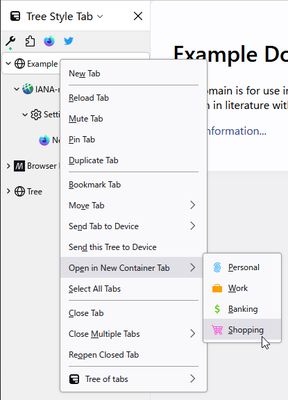
This extension provides the ability to work with tabs as "trees".
New tabs opened from the current tab are automatically organized as "children" of the current tab.
Such "branches" are easily folded (collapsed) by clicking on the arrow shown in the "parent" tab, so you no longer need to suffer from too many visible tabs.
If you want, you can restructure the tree via drag and drop.
Please enjoy as you like!
Tips:
Permissions:
This extension needs following permissions to work as expected:
Extensions extend TST:
TST provides APIs for other extensions.
Some extensions extend the behavior of TST's sidebar panel:
And there are more helper extensions.
New tabs opened from the current tab are automatically organized as "children" of the current tab.
Such "branches" are easily folded (collapsed) by clicking on the arrow shown in the "parent" tab, so you no longer need to suffer from too many visible tabs.
If you want, you can restructure the tree via drag and drop.
- Such a tree of tabs will behave like a visual browsing history for you.
- For example, if you see a list of search results for a topic, each search result link will open in new child tab.
- New tabs opened from these "child" tabs will appear as descendants of their originating tabs.
- You'll easily dig and dig deeply, without losing your browsing trail - if you want to go back to the original search result, you just have to switch to the "root" tab.
- Moreover, each tree will reflect a group of tabs on a similar topic.
Please enjoy as you like!
Tips:
- "F1" key toggles the TST sidebar.
- "Tree Style Tab" toolbar button also toggles the sidebar. If it's unnecessary, you can remove it from the toolbar.
Permissions:
This extension needs following permissions to work as expected:
- Required:
- Access browser tabs: to list both active and non-active tabs in the UI.
- Access recently closed tabs (access to the session information): to save tree information of tabs (structure, collapsed/expanded state, etc.) to tabs' session information and ask to Firefox to manage them as bundled.
- Display notifications to you: to present information and navigate users without blocking.
- Read and modify browser settings: to know the activation status of the native vertical tabs and apply suitable color matching to the browser's theme to the toolbar icon placed on the navigation toolbar.
- Optional:
- Read and modify bookmarks: to simulate bookmark related commands in the tab context menu. / to detect tabs whether they were opened from bookmarks or not.
- Get data from the clipboard: to simulate commands like "Share > Copy Links" in the tab context menu and others. / to simulate opening a new tab with the URL in the clipboard with middle click on the tab bar.
- Access your data for all websites (run scripts on webpages) / Access local files on your computer: to detect the Ctrl key is pressed/released and prevent needless expansion of collapsed trees while tab switching with Ctrl-Tab/Ctrl-Shift-Tab. / to render simulated preview panel and tab groups context menu on the content area.
- Hide and show browser tabs: just for automated tests, not required on regular use.
Extensions extend TST:
TST provides APIs for other extensions.
Some extensions extend the behavior of TST's sidebar panel:
- Multiple Tab Handler allows you to select multiple tabs with long-press on tabs. It also allows you to close multiple tabs with long-press on the closebox on tabs.
- TST Active Tab in Collapsed Tree shows a small tab on a collapsed tree as an alias for the last active tab under the tree.
- TST Auto Group Tabs provides ability to group newly opened tabs automatically in various conditions.
- TST Auto Sticky Tabs provides ability to stick some state tabs to tab bar edges automatically.
- TST Bookmarks Subpanel allows you to show a small "Bookmarks" sidebar panel below tabs in the TST's sidebar.
- TST Indent Line provides indent lines like Visual Studio Code's one.
- TST Lock Tree Collapsed allows you to lock arbitrary trees as collapsed. (This was a built-in feature on TST 3.3.0-3.3.6, and now separated.)
And there are more helper extensions.
评分 4.5(1 位用户)
权限与数据
更多信息
- 版本
- 4.4.4
- 大小
- 1.3 MB
- 上次更新
- 8 天前 (2026年9月2日)
- 隐私政策
- 阅读此附加组件的隐私政策
- 版本历史
- 添加到收藏集
*Tree Tabs:
Cross-browser, more powerful features, and high customizability.
(One large difference between TST is: the design strategy.
TST is aimed to keep it simple and work together with other addons as possible as it can.)
*Sidebery:
Another tree addon with powerful features.
* Tab Center Reborn:
Vertical tab bar without tree.
* sidebarTabs:
Vertical tab bar with grouped tabs.
There are more similar projects by someone not me, for Firefox or Chrome. Please try them if TST does not perform as you expected.
## Public API for other addons
For addon authors, Tree Style Tab provides public API. If your addon provides extra context menu items for context menu on tabs, you can easily support TST's context menu with small changes. For more details, see the API document.